

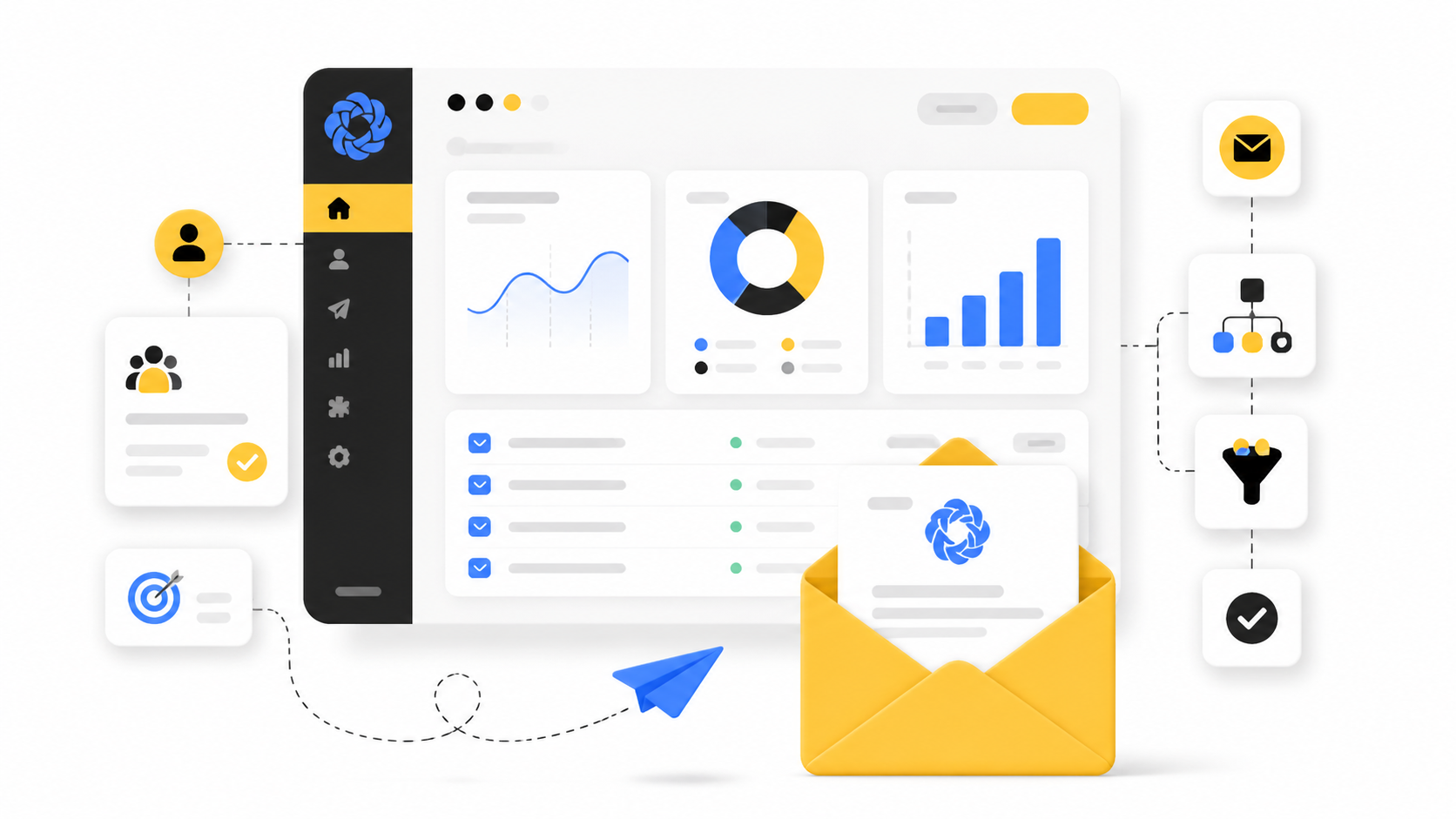
EMAIL MARKETING IS ONE OF THE MOST EFFECTIVE DIGITAL MARKETING CHANNELS for growing businesses, and Sendinblue email marketing has become one of the go‑to platforms for small to medium‑sized businesses looking to engage audiences, automate campaigns, and build stronger customer relationships. Sendinblue combines email marketing with automation, CRM, SMS, and more so teams don’t have to stitch together multiple tools to reach their goals.
What This Article Will Cover
- What Sendinblue Email Marketing Is
- Why Sendinblue Matters for Your Strategy
- A Framework Overview of the Sendinblue Platform
- Core Components That Drive Results
- Professional Implementation Tips
- What Comes Next in Your Email Marketing Journey
What Sendinblue Email Marketing Is
Sendinblue is a digital marketing platform built around email marketing and automation that helps businesses send newsletters, automated email series, transactional messages, and more across multiple channels. It has been widely adopted by marketers globally and supports features like list management, campaign analytics, and drag‑and‑drop email builders.
Unlike basic email tools, Sendinblue also includes marketing automation workflows, SMS campaigns, and CRM functionalities, allowing you to centralize your customer communications in one place.
Why Email Marketing Still Matters
Email marketing remains one of the highest‑ROI channels in digital marketing because it gives businesses direct access to their audience’s inbox — where people are already active daily. With the right strategy and tools like Sendinblue, companies can create personalized campaigns, drive conversions, and retain customers at scale.
The Sendinblue Framework Overview
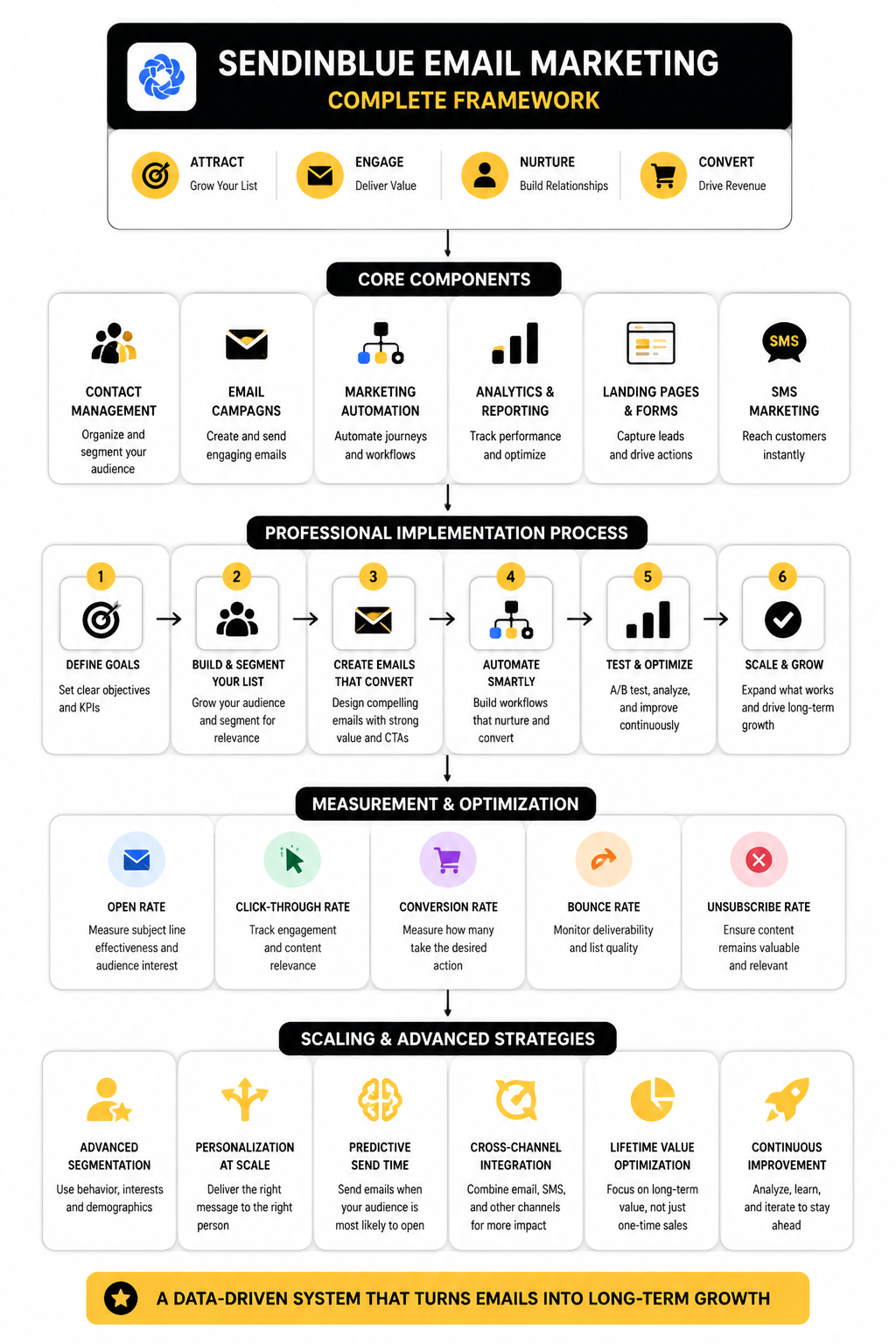
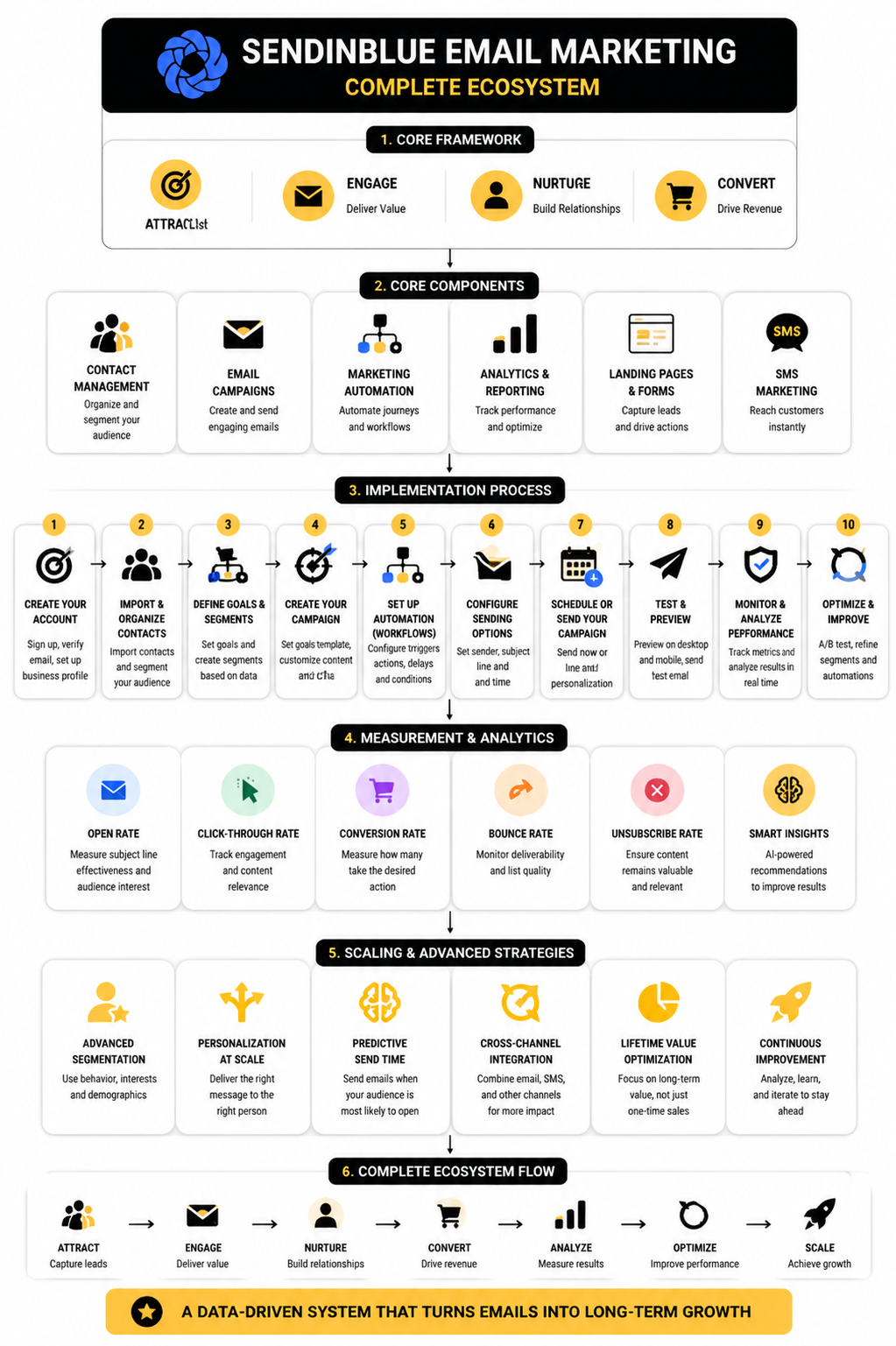
At its core, Sendinblue’s platform is organized around four pillars:
- Contact and List Management
Handling your subscribers, segmentation, and audience growth.
- Campaign Creation and Delivery
Designing emails and setting up sends with templates, personalization, and timing.
- Automation and Triggered Messages
Using behavior or dates to send the right message at the right time.
- Analytics and Reporting
Tracking opens, clicks, and campaign effectiveness to improve actions.
Core Components That Drive Results
Sendinblue’s email marketing strength comes from combining multiple features that support professional campaigns:
- Drag‑and‑Drop Email Builder — Intuitive design tools to create responsive newsletters without coding.
- Segmentation and Personalization — Tailor sends to distinct audiences for higher engagement.
- Marketing Automation Workflows — Build automated series like welcome sequences or re‑engagement flows.
- A/B Testing Capabilities — Test subject lines and message variants to improve results.
- Transactional Emails and SMS — Extend beyond newsletters to essential messages and alerts.
Professional Implementation Tips
To get the most from Sendinblue email marketing:
- Define Clear Audience Segments
Segment your contacts based on behavior, purchase history, or preferences to make emails more relevant.
- Leverage Automation First
Start with simple triggers (like welcome emails) to build engagement patterns before advancing to complex workflows.
- Use Data to Optimize
Regularly analyze open and click‑through rates to refine subject lines and content.
- Respect Inbox Best Practices
Authenticate your sending domain and follow consent rules to protect deliverability.
Once you’ve mastered these basics, you can explore deeper personalization, integrations, and cross‑channel campaigns that turn subscribers into loyal customers.
Continue to Part 2 for the next section of this article.
How Sendinblue Email Marketing Performs in the Real World
When you take Sendinblue email marketing (now branded as Brevo) into actual use, its performance isn’t just about features — it’s how it supports real campaigns, deliverability, engagement, and practical workload that matters. Across multiple industry evaluations and real‑world usage data, a clearer picture emerges of how the platform stands up in today’s crowded email marketing landscape.
Deliverability and Inbox Placement
One of the core measures of any email marketing tool is how reliably messages land in recipients’ inboxes and not the spam folder. In independent deliverability testing, Brevo (Sendinblue) demonstrated fluctuating performance over time, with recent results showing a solid deliverability rate but not always industry‑leading benchmarks. For example, tests showed that Brevo hit roughly an 88% deliverability rate in early 2024 after previous variability across years of testing.
This highlights two important realities for email marketers:
- ESP performance is only part of the deliverability equation — factors like list hygiene, sender reputation, and engagement rates also drive inbox success.
- Brands should monitor deliverability trends closely because performance can shift as networks, filters, and sending behavior evolve.
Market Adoption and Brand Footprint
Sendinblue’s migration to Brevo hasn’t reduced its market presence. Platform usage tracking indicates that over one million active websites have integrated the tool for email marketing, automation, and CRM. This broad footprint suggests a high level of comfort among marketers, particularly at small and medium business scales where cost‑to‑value is a dominant purchasing factor.
However, adoption doesn’t guarantee satisfaction across all use cases. Some users report mixed experiences about support responsiveness, interface quirks, or limits when scaling advanced campaigns — especially compared with higher‑tier tools.
Competitive Context
When placed against peers in the email marketing category, Sendinblue (Brevo) often shows its strengths and weaknesses more clearly:
- It’s frequently recognized for value for money, making advanced automation and CRM features accessible at lower cost than many competitors.
- Platforms like Mailchimp may still outperform in design flexibility, AI‑augmented workflows, and ease of use for larger teams or more complex campaigns.
This means Sendinblue email marketing fits a strategic niche: cost‑aware businesses needing automation, deliverability, and CRM integration without enterprise pricing.
Best Practices for Maximizing Campaign Impact
Getting strong results with Sendinblue email marketing isn’t automatic — it requires intentional setup and ongoing refinement. These best practices align with how professional teams leverage the platform:
1. Maintain List Health and Engagement
A clean email list is the cornerstone of deliverability. Regularly remove inactive contacts, segment based on recent engagement, and tailor messages to recipient interests to keep open and click‑through rates high.
2. Test and Optimize Key Elements
Use A/B testing to refine subject lines, preview text, and send times. Over time, these incremental improvements compound into higher engagement and reduced spam complaints.
3. Combine Email with Complementary Channels
Because email alone sometimes faces engagement headwinds, blending campaigns with SMS, push notifications, or chat follow‑ups can strengthen overall communication rhythms and conversion paths.
4. Use Automation Thoughtfully
Start with core automated flows — like welcomes, onboarding sequences, and cart reminders — before layering on advanced behavioral triggers. Well‑designed automation not only saves time but also drives consistent interaction without manual effort.
What’s Next in Your Email Marketing Journey
In Part 3, we’ll dive into how to structure your first Sendinblue email campaign, including selection of templates, segmentation strategy, and timing for maximum attention. You’ll learn actionable steps you can take today to move from setup to measurable campaign performance.
Step‑by‑Step Implementation of Sendinblue Email Marketing
Now that you understand the why and what of Sendinblue email marketing, let’s walk through how to actually implement a campaign that works — from setup to execution. This section breaks down the core steps so you can launch your first email campaign confidently and efficiently using the platform’s tools and workflow.
Preparing Your Account and Contacts
Before anything else, make sure your account is ready to send campaigns:
- Authenticate your sending domain to improve deliverability and reduce the risk of ending up in spam folders. This setup ensures mailbox providers recognize your email as legitimate.
- Import your contacts into the platform. You’ll want a clean, consent‑based list of emails ready so that your campaign has recipients to engage. Brevo supports importing from CSV files and other sources directly into your contact database.
- Organize your contacts into lists or segments so you can tailor messages. Segments are dynamic groups based on conditions like location, engagement, or purchase behavior that update automatically as contacts match criteria.
Once your contacts are structured and ready to go, you can dive into building and sending your campaign.
Designing and Launching Your First Campaign
Start by navigating to the email marketing area of your Sendinblue (now Brevo) dashboard:
1. Configure Campaign Basics
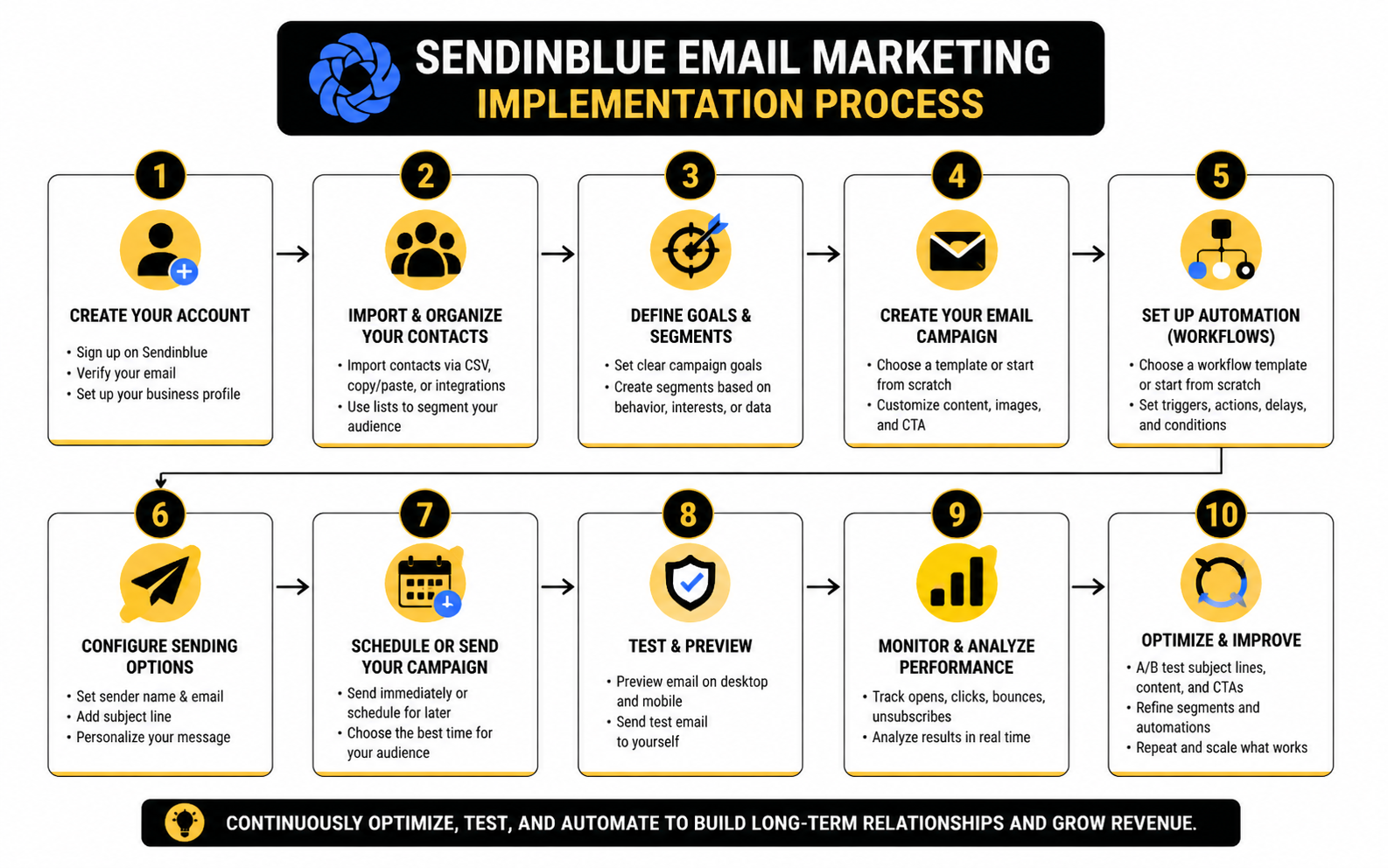
- Go to Marketing > Campaigns and choose Create campaign > Email.
- Select your sender details, including the name and email address that appears in recipients’ inboxes. This should reflect a recognizable brand or person to build trust.
- Choose the recipients for your campaign — this might be a list you imported or a segment you created. Excluding unengaged contacts at this stage can boost engagement metrics.
- Write a clear and compelling subject line and preview text. These are often the deciding factors for opens, so make them relevant and concise.
2. Create the Email Content
The email design phase is where your campaign starts to take shape:
- Use the drag‑and‑drop editor to layout text, images, buttons, and links in a visually appealing way without writing any code.
- You can start from pre‑designed templates to save time and ensure professional layouts, or build from scratch if you have specific design needs.
- Personalize content where possible by inserting contact attributes like first name, location, or past activity to make emails feel more relevant to each recipient.
- As you design, preview how the email looks on desktop and mobile to ensure optimal readability.
3. Review, Test, and Send
Before sending:
- Preview and test your email campaign by sending it to yourself or team members. Look for layout issues, spelling errors, and broken links.
- Set your send schedule — either send immediately, schedule for a specific date and time, or use automated “send at best time” options where available to maximize engagement.
- Some plans allow you to send in batches to manage traffic and avoid spikes.
Once everything is reviewed and ready, click Send or Schedule. Your email now heads out to your selected audience, triggering engagement and driving results.
Optional: Adding Automation
Beyond one‑off campaigns, you can set up automated workflows like welcome series or behavior‑triggered emails that send without manual intervention:
- Choose an automation trigger such as “contact joins list” or “birthday.”
- Add email steps and timing between sends to build a complete sequence.
- Activate the automation so it runs continuously as new contacts meet the trigger conditions.
This turns your email marketing into a dynamic system that nurtures relationships at scale rather than relying solely on manual campaign launches.
What Comes Next
In Part 4, we’ll explore metrics that matter in Sendinblue email marketing — what to track, why it matters, and how to interpret results so you can improve every campaign you send. You’ll learn how to use performance data to fine‑tune future sends for better opens, clicks, and conversions.
How to Read and Use Sendinblue Email Marketing Analytics
Once a campaign has been sent, the real work begins: understanding what the data tells you and using it to improve future email marketing decisions. The analytics available in Sendinblue (Brevo) go well beyond basic opens and clicks — they help you diagnose deliverability issues, content effectiveness, and overall audience engagement so you can refine your strategy over time.
Why Metrics Matter
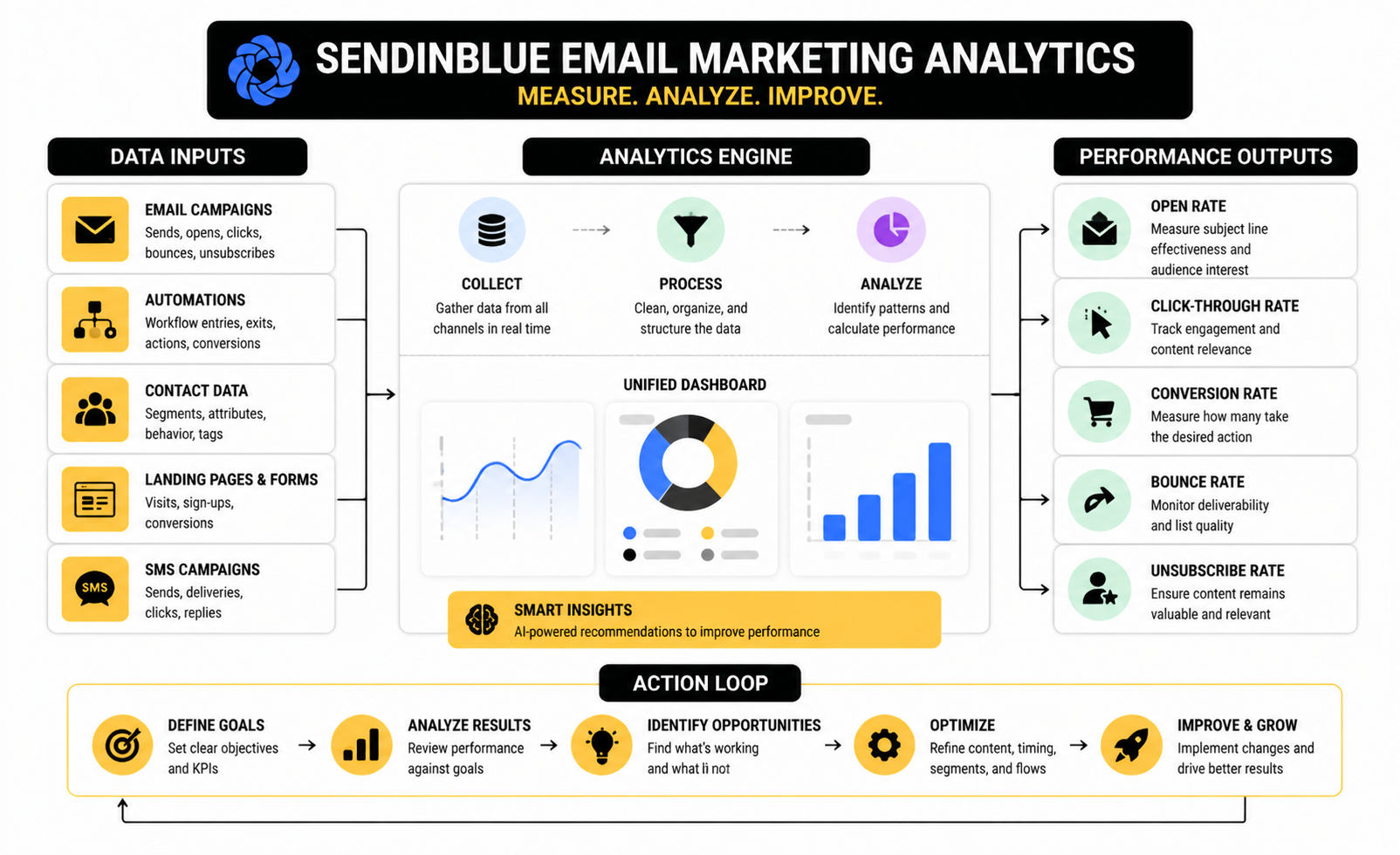
Every number in your analytics has a purpose. Some tell you whether your message reached eyes, others show whether your content moved people to act, and a few warn you when something is going wrong. Tracking metrics without understanding them can lead to wasted effort and missed opportunities; reading them correctly turns data into decisions.
Core Campaign Metrics and What They Tell You
Deliverability Rate — This is the percentage of emails that were successfully delivered to recipients’ inboxes or mail servers. A high deliverability rate is fundamental because no matter how great your content is, it can only perform if it reaches the inbox. A low rate often signals list quality or authentication issues.
Open Rate — This shows how many recipients opened your email and is often used as a early signal of engagement. In modern email marketing, technologies like Apple’s Mail Privacy Protection can inflate open rates, so use this metric as a directional indicator of interest in your subject line and sender reputation.
Click‑Through Rate (CTR) — CTR measures the percentage of delivered emails where at least one link was clicked. This is a stronger signal of meaningful engagement than opens because it shows recipients acted on your content. Comparing CTR across campaigns reveals what content or offers resonate best.
Click‑To‑Open Rate (CTOR) — CTOR divides clicks by the number of opens and isolates how effective your email content was — independent of whether the email was opened in the first place. A low CTOR with a healthy open rate often means the subject line was effective but the message body didn’t deliver on its promise.
Unsubscribe Rate — This tells you what percentage of recipients chose to opt out after a campaign. Some churn is normal, but sustained high unsubscribe rates suggest issues with relevance, frequency, or list targeting. It’s a key gauge of overall list health and subscriber satisfaction.
Bounce Rate — Bounces include both soft bounces (temporary delivery issues) and hard bounces (permanent delivery failures). Too many bounces can damage your sender reputation and should prompt immediate list cleaning or validation.
Putting Benchmarks in Context
Benchmarks provide useful reference points so you can tell whether a result is good or needs improvement. Data from the Brevo benchmark study shows that open rates, CTR, and other email KPIs vary widely by industry and audience, and should be compared to similar campaigns for accurate interpretation.
For example, a CTR around the mid‑single digits suggests that your content and calls to action are engaging broadly, while unusually high or low numbers may indicate either exceptionally strong relevance or a mismatch between message and audience. Benchmarks help you set realistic goals and measure progress over time.
What to Do with These Numbers
- Refine subject lines and preview text based on open rates to increase initial engagement.
- Test content formats and CTAs where CTR or CTOR lag, so your emails better align with recipient interests.
- Clean and segment your list if bounce or unsubscribe rates climb, protecting deliverability and subscriber experience.
- Align metrics with goals, focusing on conversion or revenue for bottom‑line impact rather than vanity metrics alone.
Understanding the story behind the numbers — not just the numbers themselves — is the key to improving your Sendinblue email marketing performance and building campaigns that consistently deliver measurable business outcomes.
What’s Next
In Part 5, we’ll cover common pitfalls and advanced strategies in email marketing with Sendinblue, including mistakes that erode growth and tactics that help you scale sustainably. You’ll learn how seasoned marketers avoid traps and use data to drive smarter decisions.
Advanced Guidance for Sendinblue Email Marketing
Once you’ve mastered the basics of setting up and measuring campaigns, the next step is refining your approach for scale, resilience, and strategic impact. Advanced considerations in Sendinblue email marketing help you avoid common traps, handle growth challenges, and optimize for long‑term audience engagement rather than short‑term spikes.
Handling Growth Without Compromising Performance
As your campaigns scale and your list grows, what worked for hundreds of contacts won’t always hold true for tens or hundreds of thousands. A few strategic tradeoffs are critical:
- Segmentation over List Size: Sending the same email to a massive, undifferentiated list can dilute engagement and increase unsubscribe rates. Instead, focus on smaller, targeted segments that reflect interests or behaviors. This keeps content relevant and metrics strong.
- Gradual Scaling: Rapidly increasing volume without proper authentication and warm‑up can harm deliverability. If you’re about to send to a much larger segment, gradually increase sends over a few days to maintain reputation.
- Dedicated Sending Domain: For high‑volume senders, using a dedicated sending domain (separate from your main business domain) reduces risk if reputation dips and isolates email marketing performance issues.
These considerations ensure that growth doesn’t come at the expense of deliverability or engagement.
Advanced Automation and Lifecycle Marketing
Automation can go far beyond simple welcome messages. Veteran email marketers use behavioral signals to build lifecycle marketing paths that respond to recipient actions:
- Behavior‑Triggered Emails: If someone clicks a specific product link but doesn’t purchase, trigger a follow‑up with a tailored offer. These triggers make messages feel timely and relevant.
- Re‑Engagement Sequences: Contacts who haven’t opened messages in 90+ days should receive a re‑engagement sequence with a compelling reason to stay. If they still don’t engage, it’s healthier to remove them to protect your sender reputation.
- Cross‑Channel Coordination: Use email in concert with SMS or chat messaging. For example, after an email offer goes out, a timely SMS reminder can boost conversions without being redundant.
Advanced automation turns Sendinblue email marketing into a reliable engine for retention and revenue, not just broadcast messaging.
Strategic Use of Data Beyond Basic Metrics
Basic campaign analytics like opens and clicks are essential, but deeper strategic signals unlock better decisions:
- Engagement over Vanity Metrics: An open rate can be influenced by modern email privacy tools and doesn’t always reflect true interest. Prioritize click‑through rates and conversion events tied to business goals such as purchases or signups.
- Segment‑Level Insights: Compare performance across segments, not just overall averages. A campaign might underperform overall while excelling in a specific demographic, signaling opportunities to tailor future content.
- Trend Monitoring Over Time: Weekly or monthly tracking of key indicators like unsubscribe rates, spam complaints, and engagement velocity helps you spot shifts in audience behavior early and adjust cadence, creative, or offers.
Interpreting deeper patterns helps transform raw numbers into actionable strategy.
Risks and How to Mitigate Them
No marketing channel is risk‑free. With email these are some expert‑level risks and how to handle them:
- Deliverability Declines: If engagement drops and your deliverability begins to slip, prioritize list cleansing and re‑authentication workflows. Remove or re‑engage dormant contacts systematically.
- Content Fatigue: Too many similar emails can desensitize your audience. Rotate themes, offers, and formats to keep content fresh and avoid unsubscribes.
- Compliance and Consent: Rules like GDPR and CAN‑SPAM require explicit consent and clear unsubscribe options. Strong data practices protect your brand and minimize legal risk.
Proactive risk management keeps long‑term email health strong and prevents unnecessary setbacks.
Leveraging Integrations for Exponential Impact
Email rarely lives in isolation. Integrating your Sendinblue email marketing setup with other systems enhances strategic value:
- CRM Integration: Sync customer data with your customer relationship management platform to enrich segmentation and tailor messaging based on lifecycle stage or purchase history.
- E‑commerce Systems: Tie in your store platform to trigger transactional or lifecycle emails like abandoned cart reminders or post‑purchase follow‑ups.
- Analytics Platforms: Feeding email data into your broader analytics ecosystem gives a unified view of user journeys and ROI attribution.
High‑performance teams use integrations to connect email results directly to business outcomes.
What Comes Next
In Part 6, we’ll wrap up with a focused FAQ and expert tips section to answer common questions about using Sendinblue email marketing, troubleshoot sticking points, and offer clear guidance on how to continue improving your campaigns with confidence.
FAQ – Built for Complete Guide
1. What exactly is Sendinblue email marketing?
Sendinblue (now branded as Brevo) is a comprehensive email marketing and automation platform that lets businesses send newsletters, automated sequences, transactional messages, SMS, and manage contacts in one tool. It also includes CRM and multichannel features like WhatsApp and chat.
2. Is there a free plan and what does it include?
Yes. The free plan allows 300 emails per day with unlimited contacts, access to core email templates, drag‑and‑drop editor, transactional emails, SMS, and basic reporting — making it a strong starting point for small lists or testing.
3. How does pricing work?
Pricing is based on monthly email volume, not contacts stored. This benefits businesses with large lists but moderate sending frequency because you don’t pay per contact like many competitors do.
4. Can beginners use it?
Absolutely. The platform is designed to be beginner‑friendly, with prebuilt templates, an intuitive editor, and onboarding tutorials to help new email marketers start quickly even without technical experience.
5. Can I send transactional emails through the same platform?
Yes — Brevo includes SMTP and API support for transactional emails like order confirmations or password resets, so you can centralize marketing and system messages in one platform.
6. Is Sendinblue suitable for cold outbound email?
No. The platform is built for permission‑based email marketing to opted‑in subscribers. Sending unsolicited cold outreach is prohibited and can lead to account suspension.
7. How do I improve deliverability?
Focus on list hygiene, authentication (SPF/DKIM), and engagement‑based segmentation. Clean lists and verified domains help messages reach the inbox rather than spam.
8. Can I segment my audience?
Yes. You can create dynamic segments based on behavior, demographics, or past engagement so that campaigns are more relevant and yield higher engagement.
9. Can I run automation workflows?
Absolutely — you can build behavior‑triggered email sequences (like welcome series or cart reminders) that run without manual sending once set up.
10. How do I remove Brevo branding from emails?
On the free plan, Brevo branding appears on sent emails. To remove it, you need to upgrade to a paid plan such as Starter or Standard.
11. What are some limitations people experience?
Some users report occasional interface quirks and slower support response compared with premium tools, and the editor may feel less polished than some competitors — things to consider at scale.
12. Can I integrate with other tools?
Yes — Brevo supports CRM integrations, e‑commerce platforms, and analytics tools, enabling richer segmentation, tracking, and coordination across marketing systems.
Work With Professionals
Explore 10K+ Remote Marketing Contracts on MarkeWork.com
Most marketers spend too much time chasing clients, competing on crowded platforms, and losing a percentage of every project to middlemen. MarkeWork gives you a better way. Browse thousands of remote marketing contracts and connect directly with companies desperate to hire skilled marketers like you, without platform commissions and without unnecessary gatekeepers.
If you're serious about finding better opportunities and keeping 100% of what you earn, invite readers to explore available contracts and create a profile for free at MarkeWork.com.