

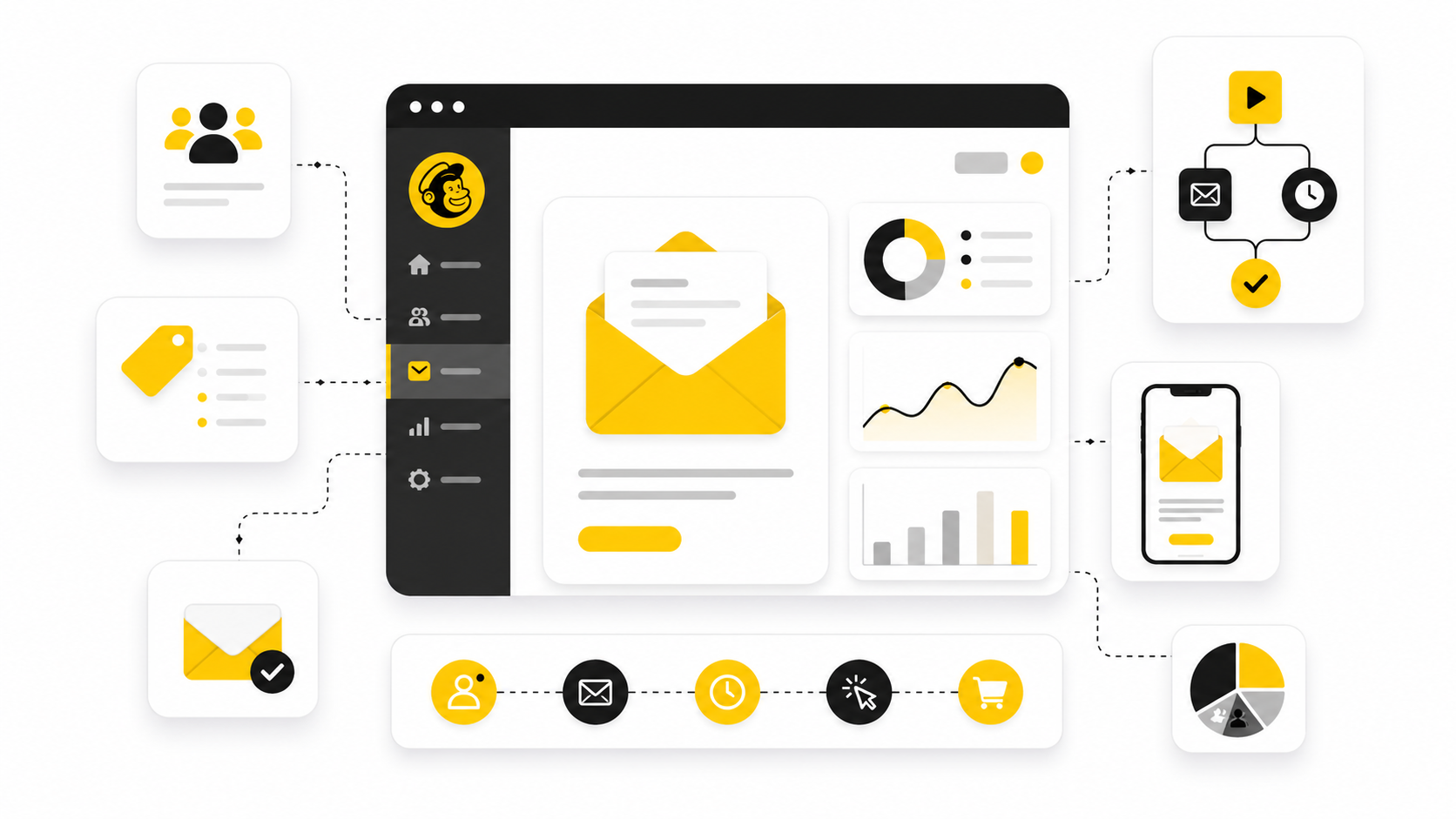
Services like Mailchimp exist because email marketing is no longer just “send a newsletter and hope.” Modern teams need automation, segmentation, landing pages, forms, CRM data, deliverability tools, analytics, and sometimes SMS or chat automation in one place.
Mailchimp is still a familiar starting point, but it is not always the best fit once your list grows, your automations get more complex, or your business needs tighter sales follow-up. A recent email marketing report found that many businesses still struggle to track ROI properly, even though teams that do measure performance often see strong returns from email campaigns through better segmentation, deliverability, and automation discipline.
This guide will compare the wider category, not just one tool against another. The goal is simple: help you understand which kind of Mailchimp alternative actually fits your business model.
The full article will continue in these six parts:
- Part 1: Why Services Like Mailchimp Matter Now
- Part 2: The Mailchimp Alternative Framework
- Part 3: Core Components To Compare Before You Choose
- Part 4: Best Services Like Mailchimp By Use Case
- Part 5: Professional Implementation And Migration
- Part 6: Final Recommendations, Mistakes To Avoid, And FAQ
Why Services Like Mailchimp Matter Now
Email marketing has become more connected to the rest of the customer journey. A welcome sequence, abandoned cart flow, webinar reminder, sales follow-up, and reactivation campaign may all touch the same person at different stages. That means the best services like Mailchimp are not just email senders; they are customer communication systems.
This matters because switching platforms for the wrong reason can create more problems than it solves. A cheaper tool may save money but weaken automation. A more advanced tool may add power but slow the team down if nobody can manage it properly.
The right decision starts with fit. For creators, a simple newsletter tool may be enough. For ecommerce, segmentation and revenue attribution matter more. For agencies or service businesses, a broader platform like GoHighLevel may make more sense because email is only one part of the client acquisition and follow-up system.
Framework Overview
The cleanest way to compare services like Mailchimp is to separate them by job, not by feature list. Most platforms look similar on the surface because they all mention templates, automations, forms, and analytics. The real difference is how well they support your actual growth motion.
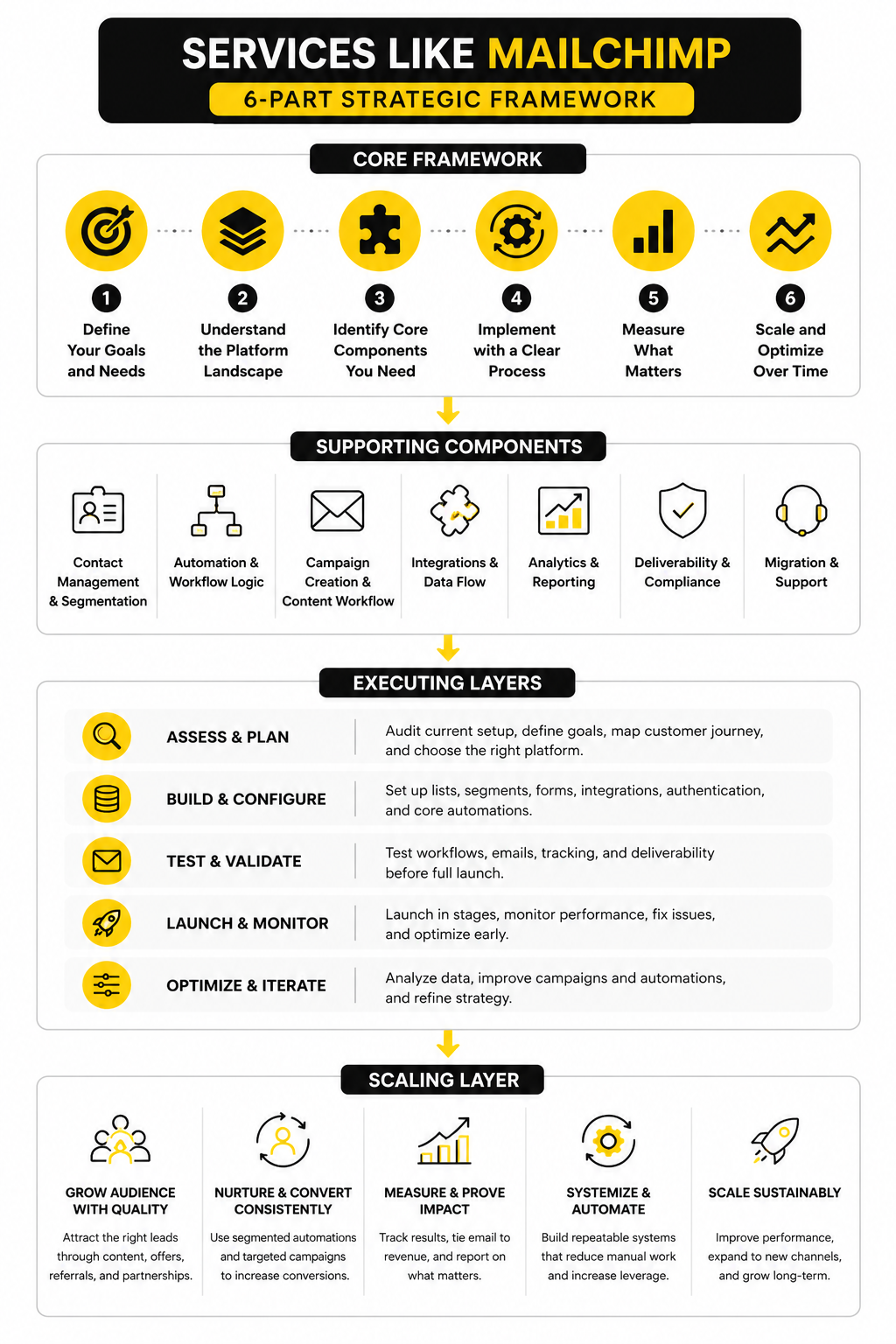
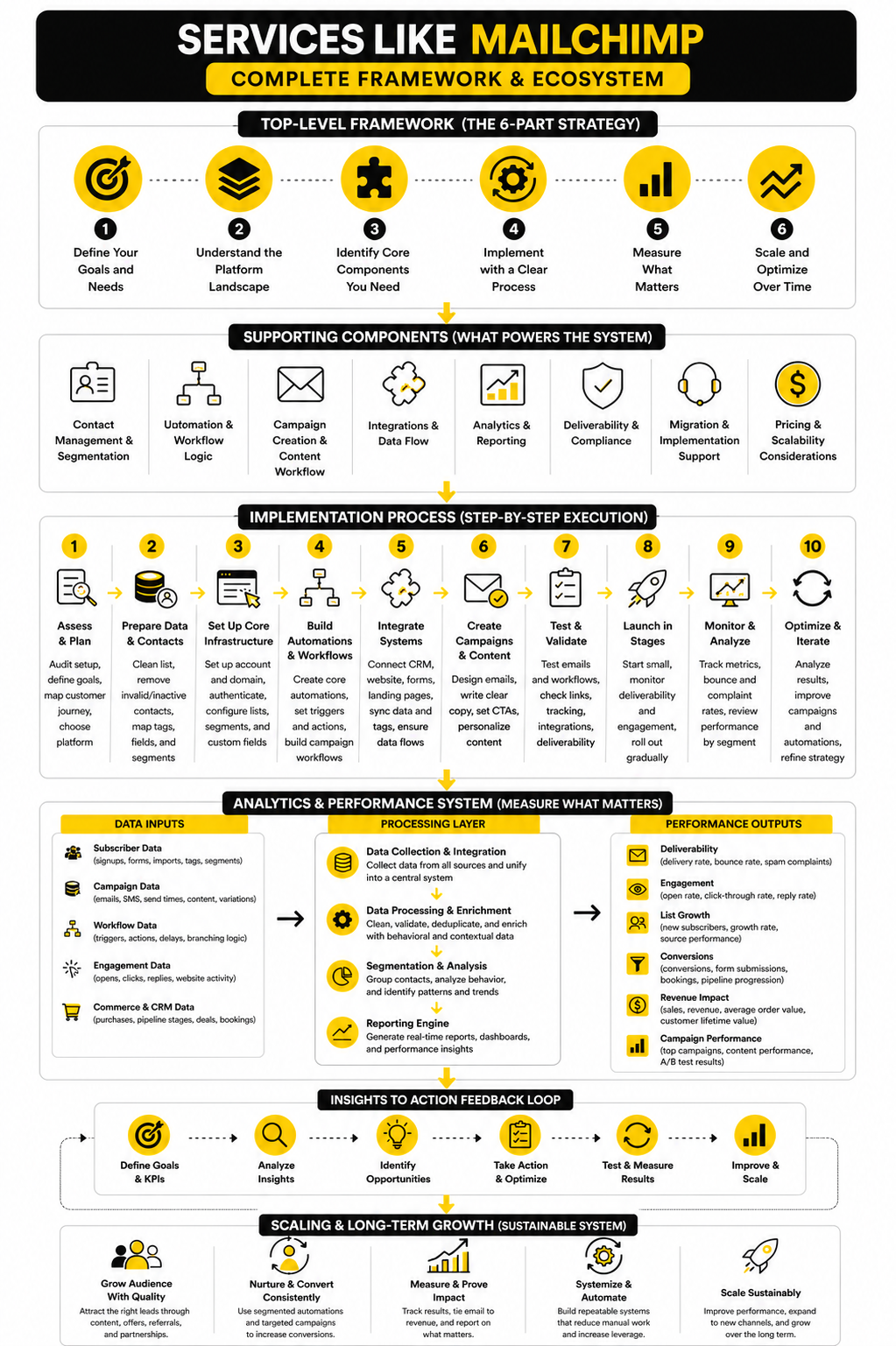
A practical framework has four layers. First, the platform must capture leads through forms, landing pages, popups, or integrations. Second, it must segment people based on behavior, source, interest, or purchase activity. Third, it must automate timely communication without making every workflow hard to manage. Fourth, it must show enough reporting to help you improve campaigns instead of guessing.
This is where tools begin to separate. Brevo is often attractive when businesses want email, SMS, and CRM-style contact management in one place. Moosend can fit teams that want approachable email automation without the heavier feel of enterprise software. ManyChat becomes relevant when email needs to work alongside chat-based marketing flows.
The Mailchimp Alternative Framework
The fastest way to choose between services like Mailchimp is to stop asking, “Which platform has the most features?” That question usually leads to bloated software, messy workflows, and a monthly bill that quietly grows with your list. A better question is, “Which platform supports the way this business actually gets leads, follows up, sells, and retains customers?”
Most teams need one of four platform types. Some need a simple newsletter and campaign tool. Some need ecommerce automation tied closely to product and purchase behavior. Some need a CRM-first system where email supports sales conversations. Others need a funnel or all-in-one marketing system where email is only one part of the broader machine.
This matters because email is getting more competitive, more automated, and more technical. Recent research on email performance found that many businesses still cannot reliably measure email ROI, while deliverability continues to limit results when campaigns are not managed properly through segmentation, authentication, and list quality. So the platform is not just a place to write emails; it is part of your revenue infrastructure.
Start With The Business Model
A creator, a SaaS company, a local service business, and an ecommerce brand should not evaluate services like Mailchimp in the same way. Their lists behave differently, their sales cycles are different, and their automation needs are not even close. The right platform is the one that matches the customer journey, not the one with the prettiest dashboard.
For creators and small publishers, the priority is usually list growth, simple broadcasts, clean forms, and monetization. For ecommerce brands, the priority shifts toward abandoned cart flows, product recommendations, post-purchase sequences, and revenue reporting. For agencies, coaches, consultants, and local businesses, email often needs to connect with pipeline stages, appointment booking, SMS, missed-call follow-up, and sales tasks.
That is why a broader system like GoHighLevel can make sense for service businesses that want CRM, automation, funnels, calendars, and follow-up in one place. It is also why a dedicated email platform may still be better for a lean newsletter business that does not need pipeline management. You are not choosing software in isolation; you are choosing the operating system for follow-up.
Match The Tool To The Main Job
The main job of the platform should be obvious before you compare pricing. If the main job is newsletters, you want fast campaign creation, readable analytics, strong deliverability basics, and simple list management. If the main job is sales automation, you want tagging, workflow logic, contact history, lead scoring, and CRM visibility.
If the main job is ecommerce growth, basic newsletter tools will feel limiting quickly. You will care more about behavioral segmentation, product feeds, purchase history, and revenue attribution than about having another template library. That is where more specialized platforms often outperform general-purpose tools.
If the main job is multi-channel follow-up, email alone is not enough. A business that gets leads through ads, forms, calls, DMs, and booked appointments may need email to work with SMS, chat, calendars, and pipeline automation. In that situation, services like Mailchimp should be compared against broader customer communication systems, not only against classic email marketing platforms.
Separate Nice-To-Have Features From Growth Features
Feature lists can be misleading because almost every platform now claims to offer automation, AI, landing pages, and analytics. The useful question is whether those features help you make better decisions or simply add more buttons. A feature is only valuable if your team will use it consistently.
Growth features usually fall into a few practical categories. Segmentation helps you send more relevant campaigns. Automation helps you follow up at the right time without manual work. Deliverability tools help your emails reach inboxes. Reporting helps you see what drives leads, sales, retention, or bookings.
Nice-to-have features are different. A large template gallery may be helpful, but it will not fix weak offers or poor list hygiene. AI subject line suggestions may save time, but they will not replace a clear positioning strategy. When comparing services like Mailchimp, prioritize the features that improve revenue, retention, and execution before getting distracted by extras.
Think About The Next Twelve Months
A platform that works today can become painful once your list, team, or offer stack changes. That does not mean you need enterprise software from day one. It means you should choose a tool that can handle the next stage without forcing a messy migration too soon.
Look at contact limits, automation limits, user permissions, integrations, reporting depth, and how pricing changes as you grow. Many teams only compare the entry-level plan, then get surprised when the real cost appears after they add more contacts, workflows, or advanced features. The cheapest option at 1,000 subscribers may not be the cheapest option at 25,000 subscribers.
This is also where implementation matters. A platform with more power requires better setup, cleaner data, and a sharper strategy. If you are not ready to maintain advanced automations, a simpler tool may produce better results because the team will actually use it.
Core Components To Compare Before You Choose
Once the platform category is clear, the next step is to compare the components that actually affect day-to-day execution. This is where services like Mailchimp start to feel very different from each other. Two tools can both say they offer “automation,” but one may handle simple welcome emails while another can run full sales pipelines, booking reminders, missed-payment follow-ups, and reactivation sequences.
The best comparison starts with the parts your team will touch every week. That means contact management, segmentation, automation, deliverability setup, campaign creation, integrations, reporting, and migration support. If one of those areas is weak, the platform may look fine during setup but become frustrating once real campaigns are running.
Do not evaluate these tools only from the pricing page. Look at how the work gets done. A platform is only useful if your team can launch campaigns, maintain automations, understand reports, and fix problems without needing a specialist every time.
Contact Management And Segmentation
Contact management is the foundation. If your lists, tags, custom fields, and consent data are messy, every campaign becomes harder to trust. This is especially important when moving from Mailchimp to another platform because old audiences, duplicate contacts, unsubscribes, and inactive subscribers can create hidden problems.
Good segmentation should let you group people by behavior, source, interest, purchase history, lifecycle stage, and engagement. Basic lists are fine in the beginning, but they get limiting once you want more relevant follow-up. A contact who downloaded a lead magnet should not always receive the same emails as someone who booked a call, abandoned a checkout, or bought three times.
For service businesses, CRM-style segmentation can be more useful than newsletter-style list management. That is where platforms like GoHighLevel become practical because contacts can be tied to pipelines, appointments, forms, SMS, and sales activity. For teams that mainly need email and simple CRM functions, Brevo can be a cleaner fit.
Automation And Workflow Logic
Automation is where many services like Mailchimp either become powerful or painfully limited. A good workflow builder should make it easy to trigger emails based on real user actions, not just dates on a calendar. The difference shows up when you need branching, conditions, wait steps, lead scoring, internal notifications, or different follow-up paths for different segments.
Start by mapping your must-have automations before choosing the tool. A welcome sequence, lead nurture flow, abandoned cart flow, appointment reminder, post-purchase sequence, and reactivation campaign each require different data. If the platform cannot access the right trigger or condition, the automation will be weaker than it looks on paper.
The best test is simple: can you explain the workflow in plain English and then build it without fighting the software? If not, the platform may be too rigid or too complicated for your team. Automation should remove manual work, not create a second job.
A Practical Implementation Process
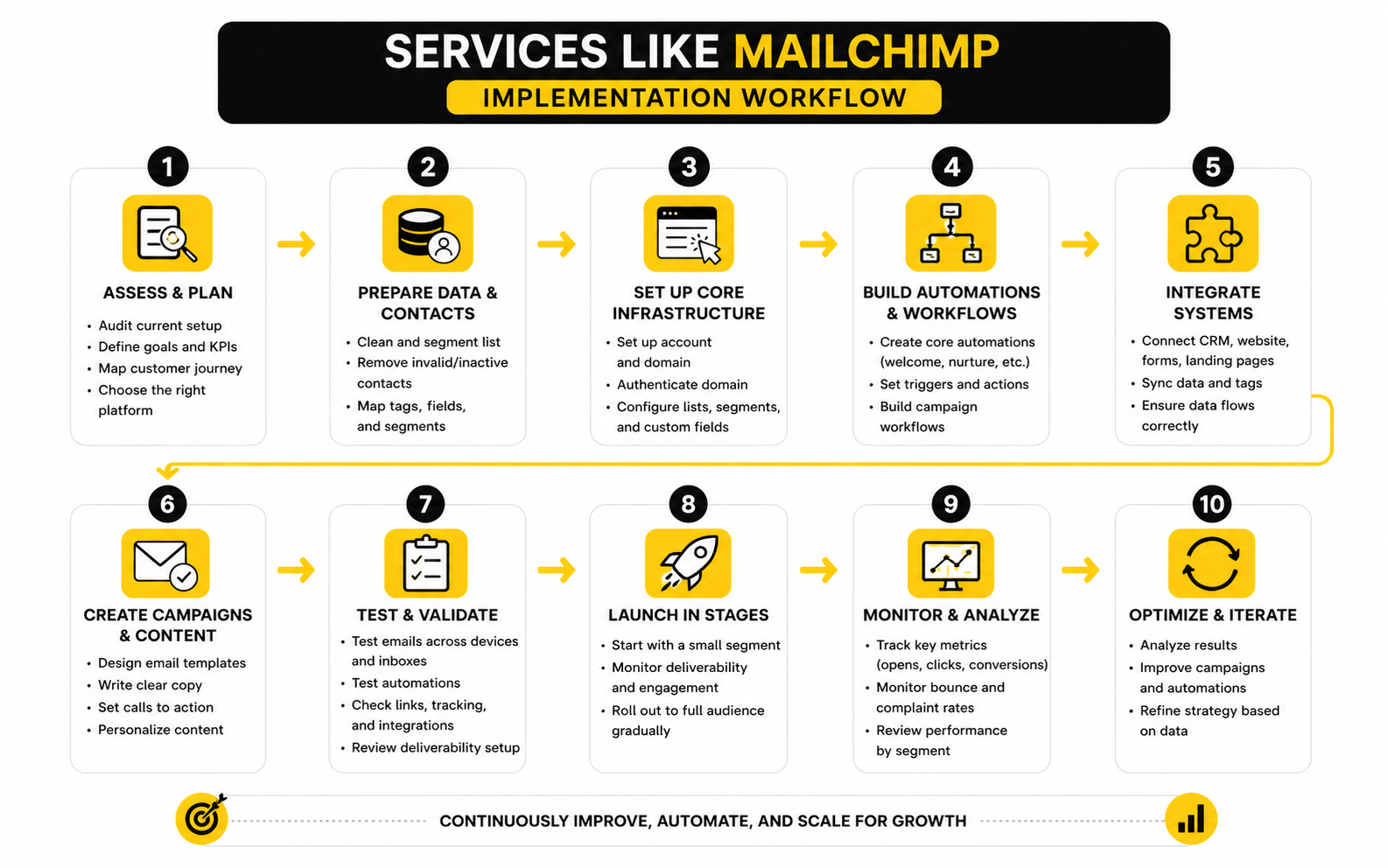
The cleanest implementation process starts with an audit. Export your current contacts, campaigns, automations, signup forms, landing pages, unsubscribe data, and performance reports. Then decide what should be migrated, what should be rebuilt, and what should be deleted.
A practical process usually looks like this:
- Audit the current setup so you know which lists, tags, forms, and automations actually matter.
- Clean the contact database before importing anything into the new platform.
- Rebuild essential forms and lead capture points so new subscribers enter the right segments from day one.
- Recreate core automations starting with welcome, nurture, sales, post-purchase, and reactivation flows.
- Set up sending authentication before launching campaigns from the new platform.
- Test every workflow manually using real signup paths and test contacts.
- Launch in stages instead of moving every campaign at once.
- Monitor early performance so you can catch deliverability, tracking, or segmentation issues quickly.
This process matters because migration mistakes are expensive. If unsubscribed contacts are imported incorrectly, you create compliance risk. If tags are mapped badly, subscribers receive irrelevant emails. If forms are missed, leads may keep entering the old system while the team thinks the migration is finished.
Campaign Creation And Content Workflow
Campaign creation should feel fast without sacrificing quality. The editor should make it easy to build readable emails, preview mobile layouts, save reusable blocks, and maintain brand consistency. A slow editor does not seem like a big issue during a trial, but it becomes annoying when your team sends campaigns every week.
Content workflow also matters. Some teams need approval steps, reusable templates, brand controls, and collaboration. Others only need a clean editor and simple scheduling. The right setup depends on whether one person owns email or several people contribute to campaigns.
For teams that build funnels around the email journey, a tool like ClickFunnels may fit better than a pure newsletter platform. For leaner businesses that want simple campaigns and automation without a heavy buildout, Moosend can be easier to manage.
Integrations And Data Flow
Integrations decide whether your email platform becomes a useful hub or another isolated tool. At minimum, it should connect cleanly with your website, forms, checkout, CRM, analytics, calendar, and customer support tools. If your customer data lives elsewhere, the email platform must receive enough of that data to send relevant follow-up.
This is why implementation should include data mapping. You need to know which fields are required, which events trigger automations, and which tools are the source of truth. Without that clarity, teams often create duplicate fields, broken tags, and inconsistent reporting.
If your funnel includes forms, quizzes, booking pages, and lead qualification, tools like Fillout and Cal.com can support the front end of the process. The email platform then becomes the follow-up engine rather than the only tool doing every job. That separation can keep the system cleaner and easier to scale.
Statistics And Data
Measurement is where services like Mailchimp either prove their value or expose weak strategy. Open rates, click rates, unsubscribes, bounce rates, conversions, and revenue attribution all matter, but none of them should be read in isolation. A high open rate with weak sales is not a win, and a lower open rate with strong booked calls or purchases may be exactly what the business needs.
Benchmarks are useful only when they create better decisions. Broad industry data can help you spot whether something is obviously broken, but your own list quality, offer, send frequency, audience intent, and deliverability setup will matter more than any generic average. The point is not to chase someone else’s number; the point is to understand what each number is telling you to fix next.
For example, Brevo’s email benchmark data shows that performance varies heavily by industry, which is exactly why one universal “good open rate” is misleading. A nonprofit audience, an ecommerce audience, and a B2B services audience do not behave the same way. If your platform cannot break performance down by segment, campaign type, and lifecycle stage, you are not really measuring email properly.
The Metrics That Actually Matter
Open rate is still useful, but it is not the metric to worship. Privacy changes, image loading behavior, inbox placement, and audience habits can all distort opens. Use open rate as an early signal of subject line strength, sender trust, and audience interest, not as the final proof that a campaign worked.
Click rate is usually more useful because it shows action. If people open but do not click, the email may have weak positioning, unclear copy, poor offer relevance, or too many competing calls to action. If people click but do not convert, the issue is often the landing page, offer, price, checkout, booking flow, or sales process.
Revenue, booked calls, demo requests, purchases, replies, retained customers, and qualified leads are stronger business metrics. This is where services like Mailchimp need to be judged by how well they connect email activity to real outcomes. A platform that gives clean attribution and segment-level reporting can help you make better decisions faster.
Build A Simple Analytics System
A good analytics system does not need to be complicated. It needs to answer a few practical questions every week: who received the email, who engaged, what they clicked, what happened after the click, and what revenue or pipeline was influenced. If the platform cannot answer those questions clearly, your team will keep making campaign decisions based on instinct.
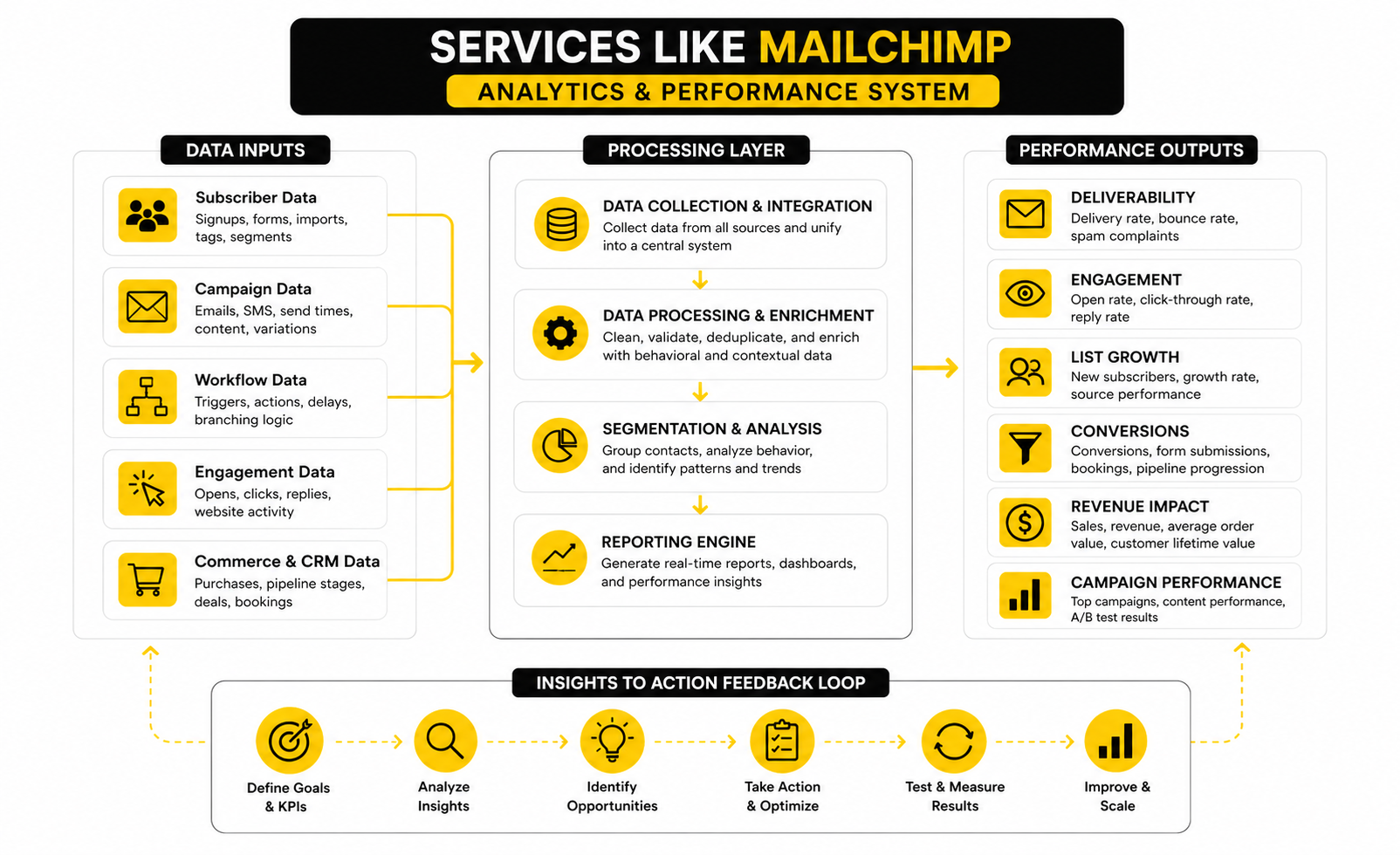
Start with campaign-level reporting, then move deeper. Track opens, clicks, unsubscribes, bounces, spam complaints, conversions, and revenue where possible. Then compare those numbers by segment, source, automation, and customer stage so you can see what is actually working.
This is where CRM-connected platforms can be valuable. A system like GoHighLevel can help service businesses connect follow-up to pipeline movement, booked appointments, and sales activity. A platform like Brevo can make sense when the business wants campaign analytics, contact management, and multi-channel communication without building a heavy CRM stack.
Read Benchmarks The Right Way
Benchmarks should trigger questions, not panic. If your open rate is far below your industry range, check deliverability, list age, subject lines, sender name, and whether the audience still recognizes you. If your click rate is low, check offer clarity, email structure, segmentation, and whether the call to action matches the reader’s intent.
Unsubscribe rate is not always bad. A small number of unsubscribes can mean your list is becoming cleaner, especially after you clarify your positioning or increase send frequency. The real warning sign is when unsubscribes rise at the same time clicks, replies, purchases, or booked calls fall.
Bounce rate deserves faster action. High bounces hurt sender reputation, which can drag down the performance of every future campaign. Before migrating to any services like Mailchimp, clean old contacts, remove obvious invalid addresses, and avoid importing cold subscribers just because they exist in an old database.
Use Data To Improve The Next Campaign
The best email teams do not stare at dashboards for the sake of it. They use data to decide what to change next. That could mean rewriting subject lines, splitting a broad list into clearer segments, changing the send time, simplifying the email, improving the landing page, or rebuilding an automation that no longer matches the customer journey.
A practical review rhythm works better than random optimization. After each campaign, check deliverability signals first, then engagement, then conversion. After each month, compare automations, broadcasts, and lifecycle campaigns separately because they serve different jobs.
This is also why tool choice matters. If a platform makes reporting hard, teams stop reviewing performance. If reporting is clear and connected to the customer journey, the platform becomes more than an email sender; it becomes a feedback system for growth.
Professional Implementation And Migration
By this point, choosing between services like Mailchimp should feel less like picking a favorite brand and more like designing a better operating system for customer follow-up. The deeper question is not whether a platform can send emails. The deeper question is whether your team can trust the data, maintain the automations, understand the reporting, and scale the system without creating chaos.
This is where advanced tradeoffs matter. More features can create more leverage, but they can also create more places for things to break. A simple email platform may be easier to manage, while a broader platform may reduce tool sprawl by combining CRM, funnels, forms, booking, and automation in one place.
That tradeoff is real. Recent martech research keeps pointing to the same issue: companies are buying more tools, but many still struggle to prove the business value of those tools because stacks become fragmented, underused, or hard to measure. So the goal is not to own more software. The goal is to build a system your team can actually operate.
The Hidden Cost Of Switching Platforms
The obvious cost of switching is the monthly subscription. The hidden cost is the time it takes to rebuild the system correctly. Contacts must be cleaned, tags must be mapped, automations must be recreated, forms must be replaced, tracking must be tested, and the team must learn a new workflow.
That is why switching from Mailchimp should have a clear reason. Maybe the current setup is too limited for segmentation. Maybe reporting does not connect email to sales. Maybe the business needs SMS, CRM, pipelines, or funnel tracking. Maybe pricing no longer makes sense as the list grows.
A vague reason like “we need something better” is not enough. Better at what? Better deliverability, better automation, better CRM visibility, better ecommerce attribution, better content workflow, or better cost control? Get specific before moving, because the migration will expose every fuzzy decision.
Deliverability Becomes A Strategic Risk
Deliverability is not just a technical detail. It is a revenue risk. If your emails do not reach the inbox, your best copy, best offer, and best automation sequence do not matter.
Modern inbox providers look at authentication, sender reputation, engagement, complaint rates, bounce behavior, and sending consistency. That means the platform matters, but your practices matter too. Even strong services like Mailchimp cannot save a poor list, irrelevant campaigns, or aggressive sending patterns.
Before scaling email volume, set up domain authentication, remove inactive or invalid contacts, avoid sudden sending spikes, and monitor complaints closely. This is especially important after migration because a new sending setup can behave differently from the old one. Treat the first few weeks as a controlled launch, not a victory lap.
Data Ownership And System Control
As the business grows, data ownership becomes more important. You should know where contact records live, which tool is the source of truth, how consent is stored, and how data moves between systems. If nobody owns that architecture, the stack slowly becomes messy.
This is where many businesses outgrow basic newsletter thinking. Email touches sales, customer success, ads, content, ecommerce, support, and operations. When each team adds its own fields, tags, forms, and integrations, the platform can become cluttered fast.
A CRM-first setup may help if sales follow-up is central to the business. GoHighLevel can be useful when the same contact needs to move through lead capture, appointment booking, pipeline stages, SMS follow-up, and email nurturing. If the business mainly needs clean campaign sending and contact communication, Brevo or Moosend may be easier to control.
Scaling Without Creating Tool Sprawl
Scaling email marketing does not always mean upgrading to a bigger platform. Sometimes it means reducing complexity. If your team uses separate tools for forms, landing pages, email, SMS, booking, CRM, attribution, and reporting, every handoff can become a failure point.
That does not mean all-in-one platforms are automatically better. An all-in-one tool can simplify operations, but only if the included features are strong enough for your use case. If one weak module forces constant workarounds, the stack may become more frustrating than a few well-integrated specialist tools.
A practical rule works well here: consolidate when the workflow is simple and tightly connected, specialize when performance matters more than convenience. For example, a service business may benefit from one platform for CRM, funnels, calendars, and follow-up. An ecommerce brand with complex product behavior may prefer specialized ecommerce email tools that connect deeply with its store data.
Advanced Automation Requires Governance
Automation gets dangerous when nobody owns it. Old workflows keep running, outdated offers stay live, contacts get conflicting messages, and internal notifications pile up. This usually happens slowly, then suddenly the team stops trusting the system.
Every advanced setup needs governance. Keep a simple automation inventory that records each workflow’s purpose, trigger, audience, owner, and last review date. Review core automations regularly, especially welcome sequences, sales nurture flows, abandoned checkout flows, reactivation campaigns, and post-purchase journeys.
This is not bureaucracy. It is how you keep the system profitable. When services like Mailchimp are used casually, they stay as campaign tools. When they are used seriously, they become part of the revenue engine, and revenue engines need maintenance.
Choosing For The Team You Actually Have
The best platform is not always the most powerful one. It is the one your team can use well. A founder-led business, a small marketing team, an agency, and an enterprise department all need different levels of flexibility, control, and support.
If your team is small, prioritize clarity and speed. If your team is technical, deeper automation and integrations may be worth the complexity. If you serve clients, white-label options, account management, templates, permissions, and repeatable workflows may matter more than a slightly cheaper subscription.
This is why final platform choice should include a brutally honest skills check. Who will build campaigns? Who will maintain automations? Who will monitor deliverability? Who will review performance? If the answer is “nobody specifically,” choose the simpler tool or commit to a cleaner implementation process before you migrate.
Final Recommendations
The best services like Mailchimp are not automatically the biggest, cheapest, or most popular. The best choice is the one that matches your customer journey, your team’s skill level, your data structure, and your growth model. That sounds obvious, but it is where most bad software decisions start.
If you mainly send newsletters, choose a platform that keeps campaign creation simple and reporting clear. If your revenue depends on appointments, pipelines, calls, and follow-up, a CRM-first platform like GoHighLevel will usually make more sense than a basic email tool. If you want email, SMS, and contact management without building a complex stack, Brevo is worth comparing carefully.
For funnel-heavy businesses, email should sit inside the full conversion path. A tool like ClickFunnels can make sense when landing pages, offers, checkout paths, and follow-up need to work together. For teams that want a lighter email automation option, Moosend may be easier to run without overbuilding the system.
Common Mistakes To Avoid
The first mistake is migrating too quickly. Moving lists, forms, tags, automations, and reporting without a cleanup plan usually creates more problems than it solves. A migration should improve the system, not copy old clutter into a new tool.
The second mistake is choosing based only on price. Cheap software becomes expensive when it blocks automation, hides important reporting, or forces the team into manual work. Expensive software becomes wasteful when the team only uses 20% of it.
The third mistake is ignoring deliverability until performance drops. Bulk sender rules from Gmail and Yahoo made authentication, one-click unsubscribe, and complaint control more important for serious senders, with spam complaint rates expected to stay below 0.3% in those requirements. That means the platform choice matters, but list quality and sending behavior matter just as much.
FAQ - Built For Complete Guide
What are the best services like Mailchimp?
The best services like Mailchimp depend on your business model. Service businesses may prefer GoHighLevel because it combines CRM, funnels, calendars, automation, and follow-up. Businesses that want email, SMS, and contact management in a cleaner marketing platform may prefer Brevo, while lean teams may like Moosend.
Why do businesses look for Mailchimp alternatives?
Businesses usually look for Mailchimp alternatives because their needs become more specific. They may want stronger automation, better CRM visibility, different pricing, ecommerce features, SMS, funnel tools, or more flexible segmentation. The switch should be based on a clear operational reason, not just frustration with the current dashboard.
Is Mailchimp still good for beginners?
Mailchimp can still work for beginners who need basic newsletters, signup forms, and simple campaigns. The issue appears when the business needs deeper segmentation, multi-step automations, or sales pipeline visibility. At that point, other services like Mailchimp may fit the workflow better.
What should I compare first when choosing an email platform?
Start with your business model and main customer journey. Then compare contact management, automation, deliverability setup, integrations, reporting, pricing at scale, and how easy the tool is for your team to maintain. Do not start with the longest feature list because that usually leads to the wrong shortlist.
Are all-in-one platforms better than email-only platforms?
All-in-one platforms are better when the workflow is naturally connected across leads, appointments, sales, and follow-up. Email-only platforms are often better when the team mainly needs campaigns, newsletters, and straightforward automations. The right answer depends on whether convenience or specialization matters more for your growth system.
How important is deliverability when switching platforms?
Deliverability is critical. A new platform does not automatically fix a weak list, poor sender reputation, or irrelevant campaigns. Before switching, clean inactive contacts, authenticate your domain, check unsubscribe handling, and launch in stages so you can monitor early performance.
Should I migrate every old contact?
No. Importing every old contact is one of the easiest ways to damage performance. Clean the list first, remove obvious invalid addresses, respect unsubscribes, and think carefully before bringing over cold subscribers who have not engaged in a long time.
What metrics matter most after switching platforms?
Start with bounces, spam complaints, unsubscribes, opens, clicks, conversions, booked calls, revenue, and replies. Early migration performance should focus heavily on deliverability and engagement signals. Once the system stabilizes, judge campaigns by business outcomes instead of vanity metrics.
Is automation worth it for small businesses?
Yes, but only when it solves a real follow-up problem. A simple welcome sequence, lead nurture flow, appointment reminder, or reactivation campaign can save time and improve consistency. Small businesses should avoid building complex workflows they do not have time to maintain.
Which services like Mailchimp are best for service businesses?
Service businesses usually need more than newsletter software. They often need lead capture, CRM, booking, pipeline tracking, SMS, reminders, and sales follow-up. That is why GoHighLevel is often a strong fit for agencies, coaches, consultants, and local service providers.
Which services like Mailchimp are best for simple email campaigns?
For simple email campaigns, prioritize ease of use, clean templates, basic automation, segmentation, and understandable reporting. Moosend and Brevo are worth comparing when you want practical email marketing without turning the stack into a full enterprise project.
How do I know when it is time to switch?
It is time to switch when the current platform blocks the next stage of growth. That could mean weak automation, poor reporting, limited segmentation, rising costs, missing integrations, or too much manual work. If the team simply needs cleaner processes, fix those first before blaming the platform.
Work With Professionals
Explore 10K+ Remote Marketing Contracts on MarkeWork.com
Most marketers spend too much time chasing clients, competing on crowded platforms, and losing a percentage of every project to middlemen.
MarkeWork gives you a better way. Browse thousands of remote marketing contracts and connect directly with companies desperate to hire skilled marketers like you, without platform commissions and without unnecessary gatekeepers.
If you're serious about finding better opportunities and keeping 100% of what you earn, explore available contracts and create a profile for free at MarkeWork.com.