

Sprout Social pricing looks simple at first: pick a plan, add users, start managing social. In reality, the total cost depends on your plan, user count, social profiles, and optional add-ons, which Sprout Social explains in its own pricing and billing help documentation.
That matters because Sprout is not a casual “schedule a few posts” tool. It is built for teams that need publishing, engagement, reporting, workflows, customer care, and analytics in one place. Current public pricing commonly starts at the Standard tier and scales through Professional, Advanced, and Enterprise, with independent software directories listing Standard around $199 per user per month when billed annually and higher monthly rates for flexible billing.

This guide breaks down Sprout Social pricing from a buyer’s point of view. Not just what the plans cost, but when the upgrade makes sense, where teams usually underestimate spend, and how to compare Sprout against lighter tools like Buffer or automation-heavy alternatives like GoHighLevel.
Article Outline
- Sprout Social Pricing: The Practical Buyer’s Guide
- Why Sprout Social Pricing Deserves a Closer Look
- The Sprout Social Pricing Framework
- Sprout Social Plans at a Glance
- What Each Plan Is Really Built For
- Core Cost Drivers Beyond the Base Plan
- Sprout Social Add-Ons and Enterprise Considerations
- Sprout Social vs Lower-Cost Alternatives
- How to Choose the Right Sprout Social Plan
- Professional Implementation Checklist
- Common Pricing Mistakes to Avoid
- Final Verdict: Is Sprout Social Worth the Price?
- FAQ
Why Sprout Social Pricing Deserves a Closer Look
Sprout Social pricing matters because the platform charges in a way that can scale quickly as your team grows. The official billing explanation says total subscription cost is shaped by the core plan, users, profiles, and optional add-ons, so the “monthly price” is only one part of the real budget. That is not a problem if Sprout becomes your team’s command center, but it is expensive if you only need basic scheduling.
The bigger question is not “Is Sprout Social cheap?” It is “Will Sprout replace enough scattered work to justify its cost?” For teams handling customer messages, approvals, analytics, reporting, and multi-channel publishing, the answer can be yes.
The risk is buying it too early. A founder, solo creator, or lean marketing team may get more immediate value from a simpler publishing tool like Buffer or a broader CRM and automation stack like GoHighLevel. Sprout becomes more compelling when social is already operationally important, not when you are still proving whether social is a serious channel.
The Sprout Social Pricing Framework
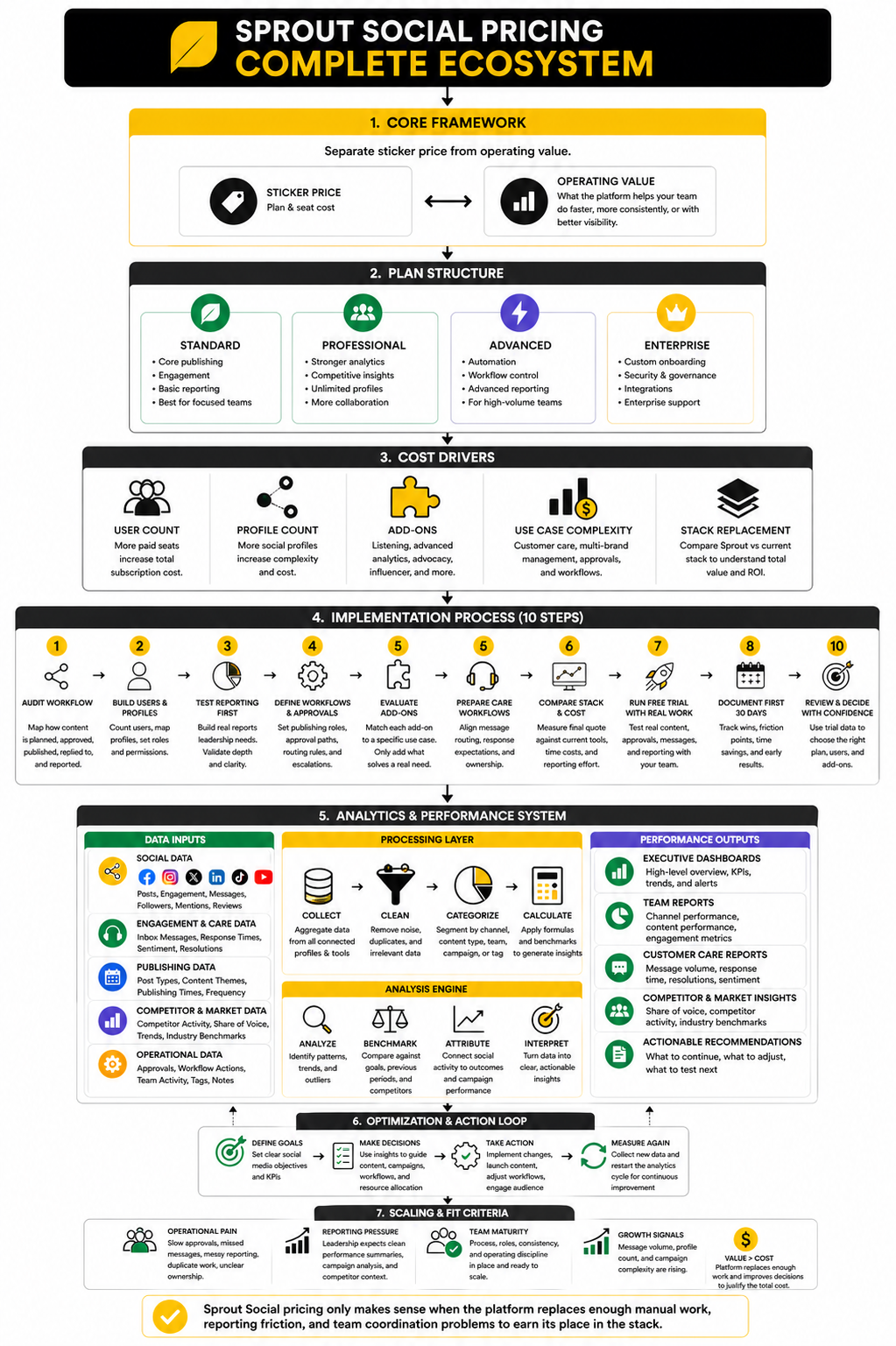
The cleanest way to understand Sprout Social pricing is to separate sticker price from operating value. Sticker price is the plan and seat cost. Operating value is what the platform helps your team do faster, more consistently, or with better visibility.
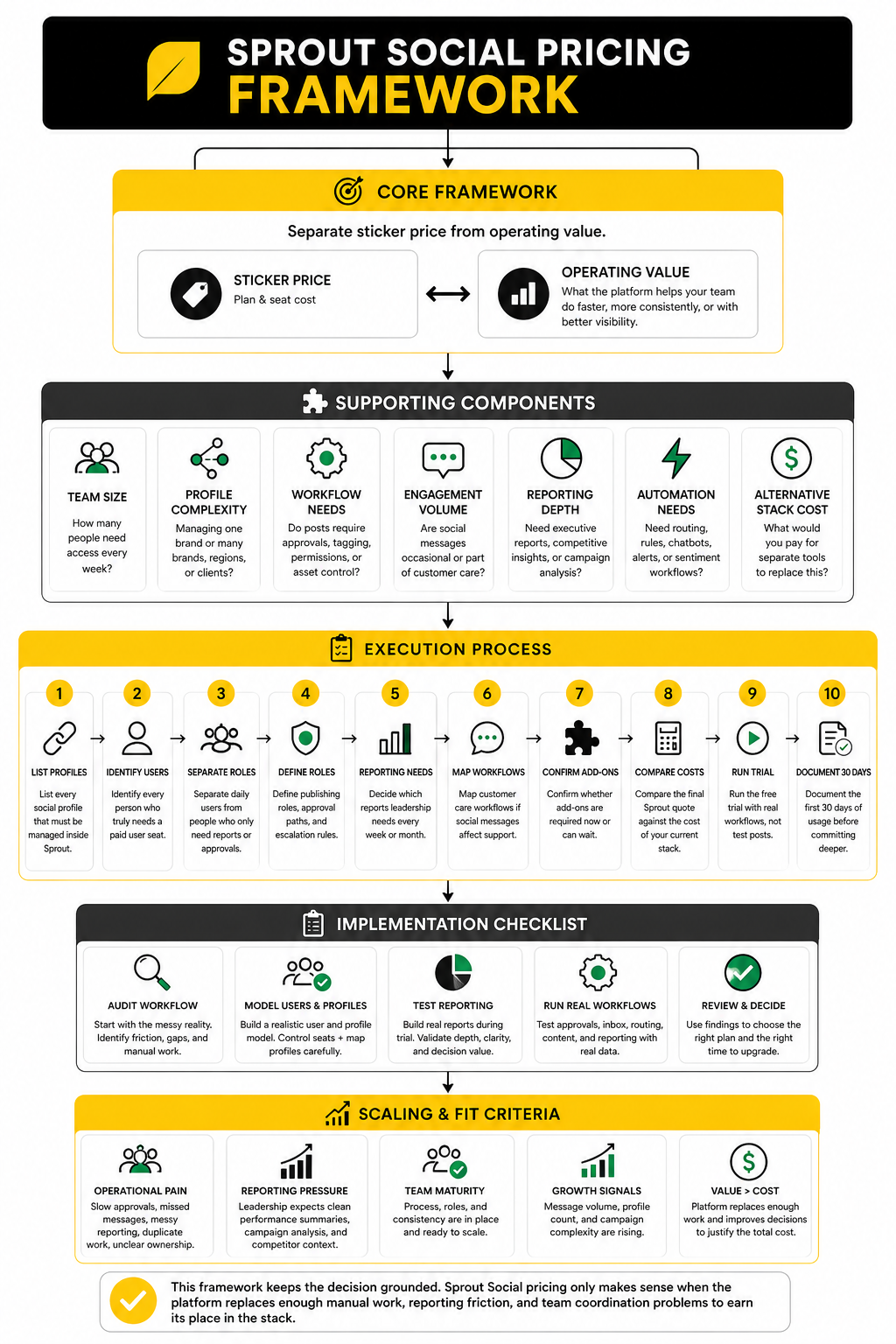
Use this framework before comparing plans:
- Team size: How many people need access every week?
- Profile complexity: Are you managing one brand or many brands, regions, or clients?
- Workflow needs: Do posts require approvals, tagging, permissions, or asset control?
- Engagement volume: Are social messages occasional, or are they part of customer care?
- Reporting depth: Do you need executive-ready reporting, competitive insights, or campaign analysis?
- Automation needs: Do you need routing, rules, chatbots, alerts, or sentiment workflows?
- Alternative stack cost: What would you pay for separate tools to replace the same workflow?
This framework keeps the decision grounded. Sprout Social pricing only makes sense when the platform replaces enough manual work, reporting friction, and team coordination problems to earn its place in the stack.
Sprout Social Plans at a Glance
Sprout Social pricing is built around four main plan levels: Standard, Professional, Advanced, and Enterprise. The public pricing page positions these as progressively stronger tiers for teams that need more profiles, deeper reporting, stronger workflows, and more automation. The important thing is that Sprout is priced per user, so a “small” upgrade can become a meaningful budget decision once multiple team members need access.
The Standard plan is the entry point for teams that want the core Sprout experience without enterprise-level complexity. It typically fits brands that need publishing, scheduling, a unified inbox, and basic reporting across a controlled number of social profiles. If your team is still mostly focused on staying consistent and keeping messages organized, this is usually the first plan to evaluate.
The Professional plan is where Sprout Social starts to feel more serious for growing teams. It usually adds stronger reporting, competitive insights, unlimited social profiles, and workflow features that matter when social is no longer a side task. This is often the first plan that makes sense for agencies, multi-brand teams, and companies that need more than simple scheduling.
The Advanced plan is built for teams that need automation, faster response workflows, and deeper operational control. It is a better fit when social messages are tied to customer experience, support, reputation, or revenue. If the team is spending too much time routing messages, tagging conversations, or manually pulling insights, Advanced becomes easier to justify.
Enterprise is not a fixed-price plan in the same way. It is built for organizations that need custom onboarding, governance, support, integrations, and commercial terms. That usually means larger teams, complex approval chains, regulated workflows, or brands managing social at serious scale.
What Each Plan Is Really Built For
Standard is best for a team that needs structure. You get the foundation: content planning, inbox management, publishing, and enough reporting to understand what is working. It is not the plan I would pick for a large agency or heavy reporting operation, but it can work well for a focused internal team that wants one clean place to manage social.
Professional is best for teams that need visibility. The jump matters because better reporting and competitive context change how you make decisions. Instead of only asking “Did we post this week?” the team can start asking “Which content, competitors, channels, and campaigns are actually moving performance?”
Advanced is best for teams that need speed and control. This is where Sprout Social pricing starts to make more sense for customer care teams, social-led brands, and companies dealing with higher message volume. Automation, sentiment tools, alerts, and approval workflows can reduce the daily drag that makes social operations messy.
Enterprise is best for organizations where social media touches multiple departments. Marketing, support, PR, legal, HR, and leadership may all need different levels of visibility or approval. At that point, the value is less about saving a few dollars per seat and more about building a system people can trust.
Core Cost Drivers Beyond the Base Plan
The base plan is only the start of the cost conversation. Sprout’s own billing guidance says total subscription cost depends on the plan, users, profiles, and optional add-ons, which means two companies on the same plan can still pay very different amounts. That is why the smartest way to evaluate sproutsocial pricing is to model the real account you need, not the lowest advertised entry point.
User count is the first major driver. A solo manager and a five-person social team are not buying the same product financially, even if they choose the same plan. Before upgrading, decide who truly needs a paid seat and who can receive reports or approvals outside the platform.
Social profile count is the second driver. A single-brand company with a few profiles has a very different cost profile than an agency managing multiple client accounts. This is one reason Professional can become more attractive than Standard when profile limits start creating friction.
Add-ons are the third driver. Premium analytics, listening, advocacy, influencer marketing, and other advanced modules can change the final quote. These can be valuable, but they should be tied to a clear use case, not added because they sound impressive.
When Sprout Social Pricing Starts to Make Sense
Sprout Social pricing starts to make sense when social is already important enough to require process. If one person is casually posting updates, the platform may feel expensive. If several people are publishing, approving, replying, reporting, and escalating issues, the value becomes much easier to see.
The clearest buying signal is operational pain. Slow approvals, missed messages, messy reporting, duplicate work, and unclear ownership are all signs that a stronger platform may pay for itself in saved time and fewer mistakes. That is especially true when social is part of customer care, not just marketing.
The second buying signal is reporting pressure. If leadership expects clean performance summaries, campaign analysis, and competitor context, lightweight tools may not be enough. In that case, Sprout is not just a scheduler; it becomes the system that turns social activity into business intelligence.
Sprout Social Add-Ons and Enterprise Considerations
Once the base plan is mapped, the next step is deciding whether Sprout’s add-ons are actually necessary. This is where sproutsocial pricing can move from predictable to quote-driven, because several of the most advanced capabilities sit outside the standard plan comparison. Sprout’s billing documentation breaks total cost into the core plan, users, profiles, and optional add-ons, which is the right lens to use before signing anything.
The most common add-on conversation usually starts with social listening, premium analytics, employee advocacy, influencer marketing, and advanced services. These are not casual extras. They are meant for teams that need deeper insight, broader distribution, or more strategic reporting than the core plans can provide.
The mistake is treating add-ons like a shopping list. A better approach is to tie every add-on to one measurable job. If social listening will help your team spot brand risk, track campaigns, or understand audience demand, it may be worth the cost. If it will sit untouched after onboarding, skip it.
Professional Implementation Checklist
The cleanest Sprout implementation starts before anyone connects a social profile. You need to decide what the platform is responsible for, who owns each workflow, and how success will be measured. Without that, even the best plan can become an expensive content calendar with too many seats.
Use this checklist before upgrading or rolling Sprout out across a team:
- List every social profile that must be managed inside Sprout.
- Identify every person who truly needs a paid user seat.
- Separate daily users from people who only need reports or approvals.
- Define publishing roles, approval paths, and escalation rules.
- Decide which reports leadership needs every week or month.
- Map customer care workflows if social messages affect support.
- Confirm whether add-ons are required now or can wait.
- Compare the final Sprout quote against the cost of your current stack.
- Run the free trial with real workflows, not test posts.
- Document the first 30 days of usage before committing deeper.
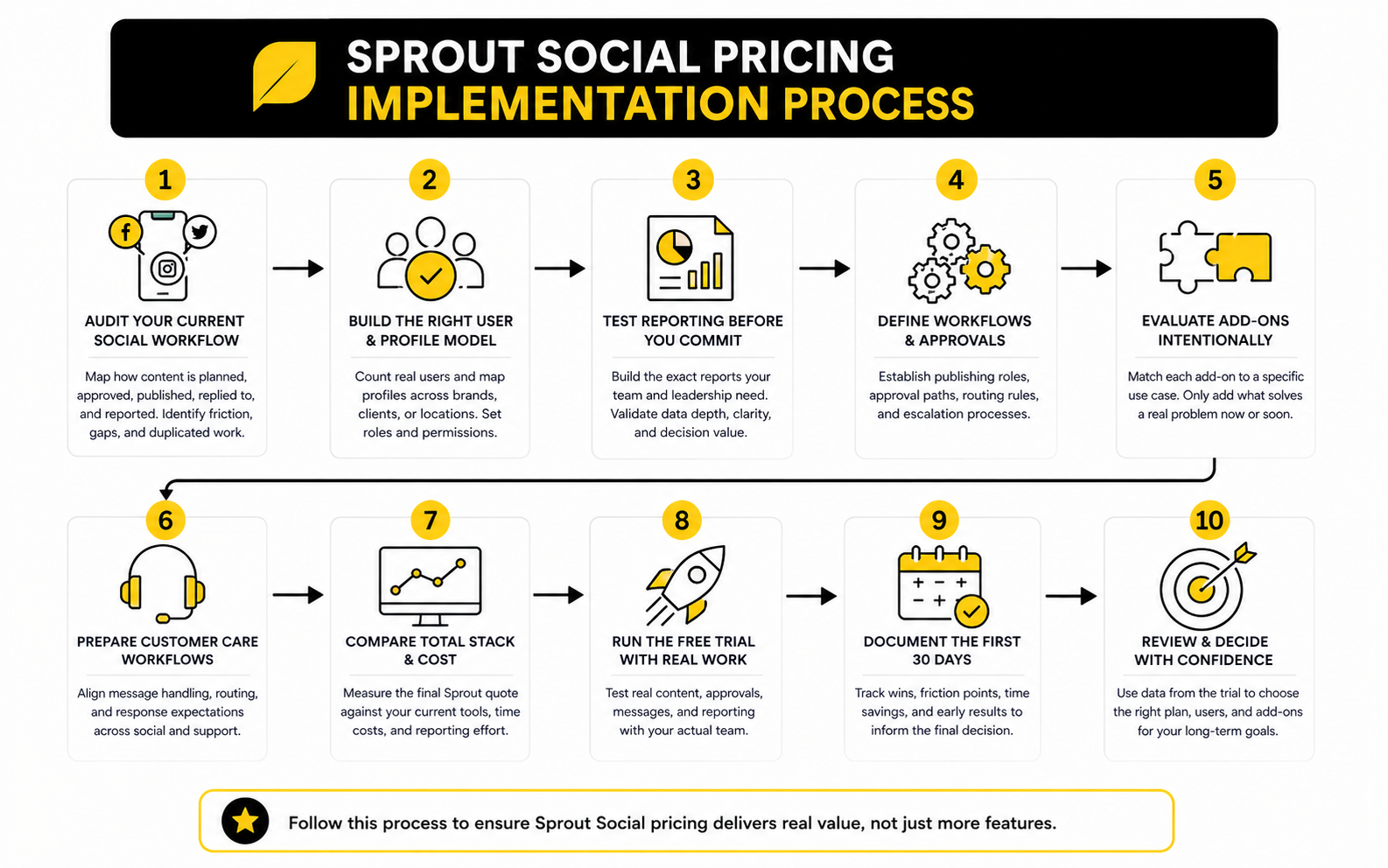
This process matters because Sprout Social pricing rewards clarity. If you know exactly who needs access and what they need to do, the buying decision becomes much cleaner. If you guess, you can easily overbuy seats, underuse features, or upgrade before the team is ready.
Step 1: Audit Your Current Social Workflow
Start with the messy reality, not the software demo. Write down how content is currently planned, approved, published, replied to, and reported. The gaps in that workflow will tell you which Sprout features matter and which ones are just nice to have.
Look for friction that happens every week. Missed comments, unclear ownership, slow approvals, scattered assets, manual reports, and duplicated work are all practical signals. These issues are more useful than a generic feature comparison because they show where the platform can remove pain.
This audit also protects your budget. If most problems are caused by unclear internal ownership, buying a higher plan will not magically fix them. Sprout can support a stronger process, but it cannot replace process discipline.
Step 2: Build the Right User and Profile Model
The next step is building a realistic user and profile model. Count the people who need to work inside Sprout regularly, then separate them from stakeholders who only need exported reports or occasional visibility. This is especially important because per-user pricing can multiply quickly as more people ask for access.
Then map your profiles carefully. A single brand with a few channels is simple. A regional company, franchise, or agency may need a much more deliberate setup across brands, clients, locations, and permissions.
This is where the Professional plan can become more practical than Standard for some teams. If profile limits or workflow complexity become daily blockers, the cheaper plan may not actually be cheaper in operational terms. But if your profile list is small and stable, Standard can still be a sensible starting point.
Step 3: Test Reporting Before You Commit
Reporting is one of the biggest reasons teams consider Sprout, so do not leave it until after purchase. During the trial or demo process, build the exact reports your team would use with leadership, clients, or department heads. A report that looks impressive in a sales walkthrough is not always the same as a report your business will actually use.
Check whether the plan gives you the right level of detail. Some teams only need basic post and profile performance. Others need campaign reporting, competitor context, custom views, tags, and deeper analysis.
This is also where alternatives should be tested honestly. If you mainly need simple scheduling and lightweight reporting, Buffer may be enough. If social needs to connect with funnels, CRM, automation, and lead follow-up, GoHighLevel may be the more practical system to evaluate alongside Sprout.
Statistics and Data That Actually Matter
The best way to evaluate sproutsocial pricing is to connect cost to measurable business outcomes. A higher monthly bill is hard to defend when the only metric is “we posted more.” It becomes easier to defend when the platform helps the team improve response speed, campaign reporting, content decisions, customer care, and leadership visibility.
Sprout’s own market data shows why this matters. The 2025 Sprout Social Index was built from surveys of more than 4,000 consumers and 1,200 marketers, and it frames social as a business-impact channel rather than a brand-awareness side project. That is the shift buyers need to understand: the platform is priced for teams that want social data to influence decisions, not teams that only want a queue of scheduled posts.
The strongest data point is commercial intent. Sprout’s annual reporting cites its 2025 Index showing that 81% of consumers say social drives them to make impulse purchases, and roughly one-third expect to make more purchases through social networks in 2025. That does not mean every brand should immediately buy Sprout, but it does mean social activity needs cleaner measurement than vanity metrics alone.
The Measurement System to Build Before You Upgrade
Before committing to a higher Sprout plan, define the analytics system you want the platform to support. This should not be complicated. It should answer the questions your team already gets from leadership, clients, support, or sales.
Start with four measurement layers:
- Activity metrics: posts published, campaigns launched, messages handled, profiles managed
- Engagement metrics: comments, shares, saves, replies, clicks, audience interaction quality
- Operational metrics: response time, approval speed, message routing, workload by team member
- Business metrics: qualified traffic, influenced leads, customer issues resolved, campaign-attributed revenue
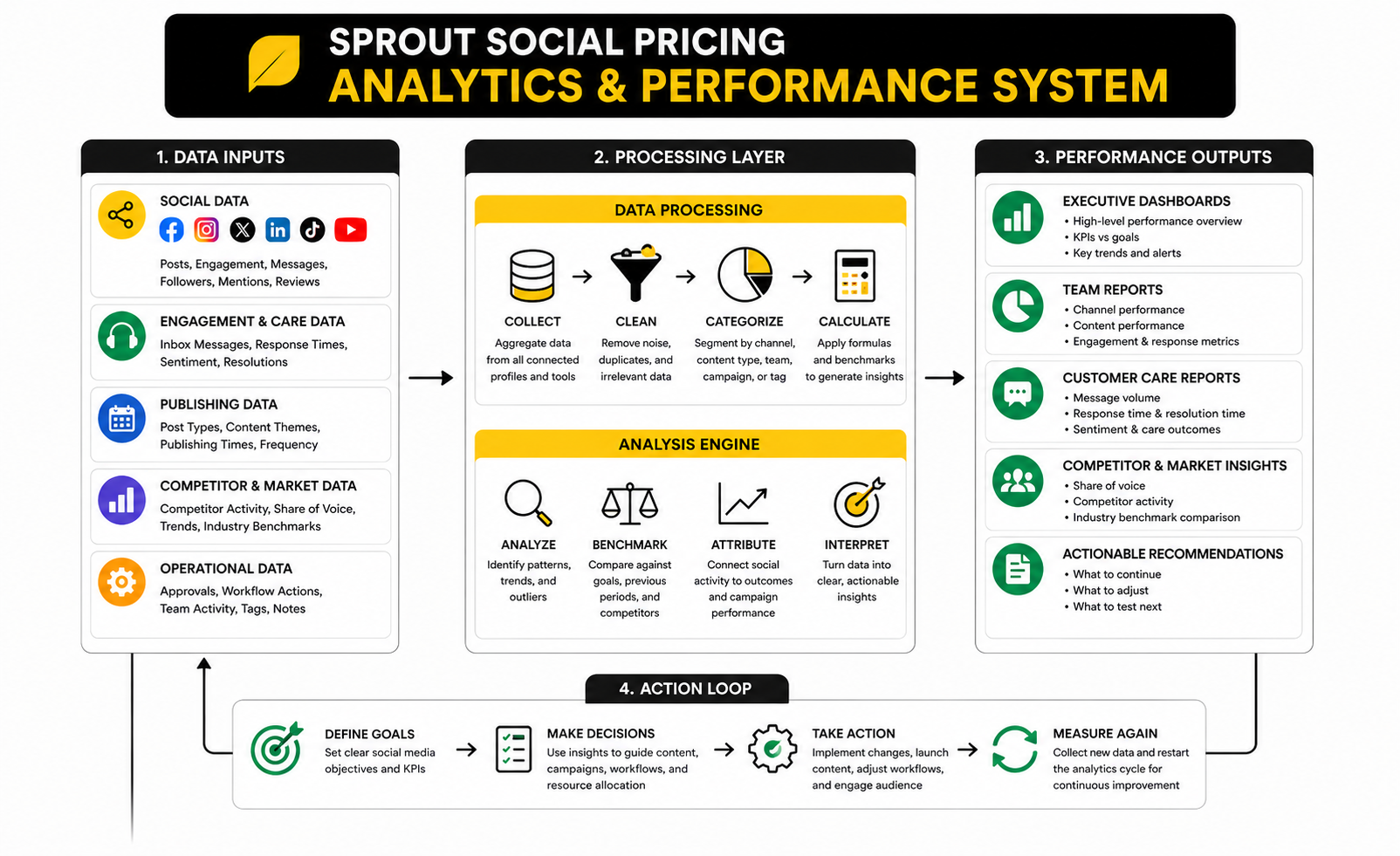
This structure keeps reporting honest. Activity metrics show whether the team is doing the work. Engagement metrics show whether people care. Operational metrics show whether the team is becoming more efficient. Business metrics show whether social is connected to outcomes the company already values.
How to Interpret Social Media Benchmarks
Benchmarks are useful, but they are not strategy. A general engagement benchmark can tell you whether performance is in a normal range, but it cannot tell you whether your audience, offer, creative angle, or channel mix is right. This is where many teams misuse analytics.
The better move is to compare against your own baseline first. Look at the last 90 days of publishing volume, engagement rate, click-through behavior, message volume, and response time. Then use Sprout to understand whether performance improves after process changes, not just after random content experiments.
External benchmarks become more useful after that. If your engagement is below category norms, you can inspect content quality and posting mix. If engagement is healthy but traffic or conversions are weak, your issue may be offer alignment or landing page quality, not social execution. In that case, a funnel tool like ClickFunnels or a broader CRM workflow in GoHighLevel may matter more than another social analytics upgrade.
Performance Signals That Justify a Higher Plan
A higher Sprout plan is easier to justify when the data shows a real bottleneck. If your team is losing time manually tagging messages, building reports in spreadsheets, or chasing approvals across Slack and email, advanced workflow and reporting features can create practical value. The point is not to buy more features; it is to remove the repeated work that slows the team down.
Look for these upgrade signals:
- Message volume is increasing and response ownership is unclear.
- Reporting takes hours every week or month.
- Leadership wants channel, campaign, or competitor analysis.
- Multiple people need approval workflows and permissions.
- Customer issues regularly appear in social comments or DMs.
- Social data needs to inform product, support, sales, or brand decisions.
These signals are more reliable than generic feature desire. A team with low message volume and simple reporting may not need Advanced, even if the demo looks impressive. A team with serious customer care pressure may outgrow Standard quickly, even if the entry plan looks cheaper.
What the Data Should Make You Do
Good analytics should lead to action. If your reports do not change what the team publishes, how fast it responds, or where the company invests, the reporting is not doing its job. Sprout Social pricing becomes much easier to defend when each report has a decision attached to it.
For content, the action might be changing formats, hooks, posting cadence, or channel focus. For engagement, it might be improving response templates, routing rules, or community management coverage. For business impact, it might be connecting social clicks to landing pages, email capture, demos, bookings, or revenue workflows.
This is the practical standard: every metric should answer “so what?” If a number does not help the team make a better decision, reduce it, remove it, or move it to a secondary dashboard. Clean measurement beats bloated reporting every time.
Strategic Tradeoffs Before You Commit
The biggest tradeoff with sproutsocial pricing is focus versus breadth. Sprout is strong when the job is social media management, analytics, engagement, and team workflow. It is not trying to be your landing page builder, email platform, CRM, funnel builder, or all-in-one sales system.
That distinction matters because many teams do not only need social publishing. They need a full path from attention to lead capture to follow-up. If social is only one piece of a larger acquisition machine, compare Sprout against the total stack you would need around it, not just against another scheduler.
For example, a brand that needs deep social reporting may be better served by Sprout. A service business that wants ads, forms, booking, SMS, email, pipeline tracking, and client follow-up may get more practical leverage from GoHighLevel. A lean creator or small team that mainly needs simple publishing may be better off starting with Buffer before moving into a heavier platform.
Sprout Social vs Lower-Cost Alternatives
Lower-cost alternatives are not automatically weaker. They are often narrower. That can be a good thing if your needs are simple and your team does not need the full operational depth Sprout provides.
Buffer is the obvious comparison for smaller teams because it focuses on straightforward planning, publishing, and lighter analytics. It will not replace Sprout for advanced workflows, social customer care, or deeper reporting. But if your current pain is simply “we need to post consistently without overcomplicating the process,” paying for Sprout too early can be overkill.
GoHighLevel is a different comparison because it is not a pure social media management platform. It becomes relevant when social is part of a funnel, appointment, CRM, or agency workflow. If your goal is to turn social attention into booked calls, nurture sequences, and pipeline activity, GoHighLevel may solve more of the revenue workflow even if Sprout is stronger for social-specific analytics.
Scaling Issues Most Teams Miss
The first scaling issue is seat creep. Teams often start with a few essential users, then gradually add leadership, support, content, paid social, contractors, agencies, and regional stakeholders. Because Sprout is priced per user, access discipline matters from day one.
The second scaling issue is workflow complexity. More profiles, brands, approvals, and message types create more places for the system to break. If roles are unclear, a stronger platform can expose the mess faster than it fixes it.
The third scaling issue is reporting demand. Once leadership sees better social data, they often want more breakdowns, more dashboards, and more attribution. That can be valuable, but it can also create reporting bloat if nobody decides which numbers actually drive decisions.
Risks to Watch Before Buying
The main risk is paying for maturity you have not built yet. A team with no clear publishing cadence, no content owner, and no response process will not magically become sophisticated because it buys a premium platform. Software supports operating discipline; it does not replace it.
Another risk is confusing analytics with strategy. Sprout can show what is happening across channels, but your team still needs to decide what positioning, offers, content angles, and audience segments matter. Better dashboards do not fix weak messaging.
The final risk is underestimating adoption. If the team keeps using spreadsheets, Slack threads, and manual reports after buying Sprout, the subscription becomes expensive shelfware. Before committing, make sure the daily users are involved in the trial and that workflows are tested with real content, real approvals, and real reporting needs.
How to Choose the Right Sprout Social Plan
Start with the smallest plan that removes a real bottleneck. That sounds obvious, but it is the easiest rule to ignore during a polished demo. Do not buy Advanced because it feels impressive; buy it because Standard or Professional leaves a specific operational problem unsolved.
Use this decision path:
- Choose Standard if you need core publishing, engagement, and reporting for a focused team.
- Choose Professional if you need stronger analytics, competitive context, unlimited profiles, and more serious collaboration.
- Choose Advanced if message volume, automation, approvals, and response workflows are becoming operationally important.
- Choose Enterprise if governance, procurement, integrations, support, security, or multi-team complexity require custom handling.
The right plan should feel slightly ahead of where your team is today, not wildly ahead of your current process. You want room to grow, but not so much unused capability that the platform becomes hard to justify. That is the practical middle ground.
Final Verdict: Is Sprout Social Worth the Price?
Sprout Social is worth the price when social media is already a serious operating channel for your business. If your team needs publishing, engagement, approvals, reporting, customer care, and analytics in one structured platform, the cost can make sense. If you only need basic scheduling, sproutsocial pricing will probably feel heavy compared with lighter tools.
The practical verdict is simple. Buy Sprout when it replaces messy workflows, improves response quality, and gives leadership reporting they can actually use. Do not buy it just because the dashboard looks polished or because competitors use it.
The strongest Sprout buyer is usually a growing brand, agency, or multi-person marketing team with real social volume. The weakest buyer is a solo operator who has not yet proven that social is a consistent acquisition, support, or brand channel. That gap matters because the same software can be either a smart investment or an expensive distraction depending on maturity.
FAQ - Built for Complete Guide
How much does Sprout Social cost?
Sprout Social pricing depends on the plan, number of users, number of social profiles, and optional add-ons. Public plan pricing typically increases from Standard to Professional to Advanced, while Enterprise is quote-based. Always model your real team size before judging the price.
Is Sprout Social priced per user?
Yes, Sprout Social is generally priced per user. That means cost can increase quickly when more team members need direct access. Before buying, separate daily users from stakeholders who only need reports.
Does Sprout Social have a free plan?
Sprout Social usually offers a free trial, not a long-term free plan. The trial is useful because you can test publishing, inbox workflows, reporting, and approvals before committing. Treat the trial like a real implementation test, not a casual product tour.
Which Sprout Social plan is best for small teams?
Small teams should usually start by evaluating Standard or Professional. Standard can work if the main needs are publishing, engagement, and basic reporting. Professional becomes more attractive when the team needs stronger analytics, unlimited profiles, and more collaboration depth.
When should a team upgrade to Advanced?
Advanced makes sense when automation, message routing, approvals, and response workflows become important. If your team handles high message volume or social customer care, the upgrade can save time and reduce missed work. If those problems do not exist yet, upgrading may be premature.
Is Sprout Social good for agencies?
Sprout Social can be strong for agencies that manage multiple clients, profiles, reports, and approval workflows. The value depends on whether the agency can turn those features into better client service and cleaner reporting. Agencies should be especially careful with user seats and profile requirements because costs can scale fast.
What are Sprout Social add-ons?
Sprout Social add-ons can include advanced capabilities such as listening, premium analytics, advocacy, influencer marketing, and other expanded services. These should be evaluated against a specific business use case. Do not add them just because they sound powerful.
Is Sprout Social better than Buffer?
Sprout Social is generally stronger for larger teams, deeper reporting, engagement workflows, and social operations. Buffer is usually better for simpler publishing needs and leaner teams. The better choice depends on whether you need operational depth or straightforward scheduling.
Is Sprout Social better than GoHighLevel?
Sprout Social is better if your main priority is social media management, reporting, engagement, and workflow control. GoHighLevel is better if your priority is CRM, funnels, follow-up, appointments, automation, and client acquisition systems. If social is only one part of your revenue engine, compare the full stack before deciding.
Can Sprout Social replace a CRM?
Sprout Social can support social engagement and customer care workflows, but it is not a full CRM replacement for most businesses. If you need pipeline tracking, sales automation, bookings, email follow-up, and lead management, you will likely need a dedicated CRM or all-in-one platform. That is where a system like GoHighLevel may fit better.
What is the biggest mistake buyers make with Sprout Social pricing?
The biggest mistake is buying a plan based on features instead of workflow needs. A feature only matters if your team will use it consistently and it solves a real problem. Otherwise, the subscription becomes expensive shelfware.
How should I calculate Sprout Social ROI?
Start with time saved, reporting quality, response speed, customer care improvements, and better campaign decisions. Then compare those benefits against the total subscription cost, including seats and add-ons. The cleanest ROI case comes from replacing manual work and improving decisions, not just publishing more content.
Is Sprout Social worth it for solo creators?
Usually, no. Solo creators often get better value from simpler tools unless they have unusually complex reporting, engagement, or brand management needs. If you are still building consistency, start lean and upgrade later.
Should I choose monthly or annual billing?
Annual billing may reduce the effective monthly cost, but it also increases commitment. Monthly billing gives more flexibility while you are still validating fit. If your workflows are not proven yet, flexibility can be worth paying for.
Work With Professionals
Explore 10K+ Remote Marketing Contracts on MarkeWork.com
Most marketers spend too much time chasing clients, competing on crowded platforms, and losing a percentage of every project to middlemen.
MarkeWork gives you a better way. Browse thousands of remote marketing contracts and connect directly with companies desperate to hire skilled marketers like you, without platform commissions and without unnecessary gatekeepers.
If you're serious about finding better opportunities and keeping 100% of what you earn, explore available contracts and create a profile for free at MarkeWork.com.